Most MUST and Axpert error codes are the inverter protecting itself, not a dead unit. On a MUST PV18 or PH18 off-grid inverter, codes 01 to 58 are faults (output stops, red light on) and 61 to 77 are warnings (the unit keeps running). So 04 means the battery voltage is too low, 64 is a low-battery warning, 56 means the battery connection is open, and 08 is an internal bus voltage fault. On an Axpert, the same numbers can be either a fault or a warning: a solid red LED means fault, a flashing red LED means warning. Overload, heat and a flat battery after a long brownout you can usually sort out yourself. Battery, wiring and internal codes are for an electrician or the repair centre.
Last checked 3 Nov 2026, against MUST's PV18 2–5.5 kW and PV1800 PRO (PH18) manuals and Voltronic's Axpert VM III, VM II PF1 and MKS II manuals. Lists differ between models, so match the code to the manual for your exact model.
First, safety
Solar DC, battery DC and grid or generator AC all meet inside these inverters. Both manuals' safety sections say:
- Don't open the unit. "Do not disassemble the unit. Take it to a qualified service center."
- Switching it off isn't enough. "Disconnect all wirings before attempting any maintenance or cleaning. Turning off the unit will not reduce this risk."
- Batteries can spark. Be very careful with metal tools near batteries; a dropped tool can short them "and could cause an explosion."
So here, "you" means no tools and no cables: reading the screen, switching loads off, clearing space around the unit, letting the battery recharge, and one on/off restart. The battery/DC side (cables, fuses, battery settings, panels) and the AC wiring (tripping breakers, generator hookups) are for a licensed electrician or your installer.
Fault or warning? How to read the screen
MUST PV18 / PH18 | Axpert (Voltronic) | |
|---|---|---|
Fault | Codes 01–58, error icon on, buzzer beeps continuously, red LED on | Red LED solid on, code shown with the fault icon |
Warning | Codes 61–77, icon flashing, unit keeps running | Red LED flashing, code flashing |
Same number, two meanings? | No: faults and warnings use different numbers | Yes: 01, 02, 03, 04 and 07 exist as both |
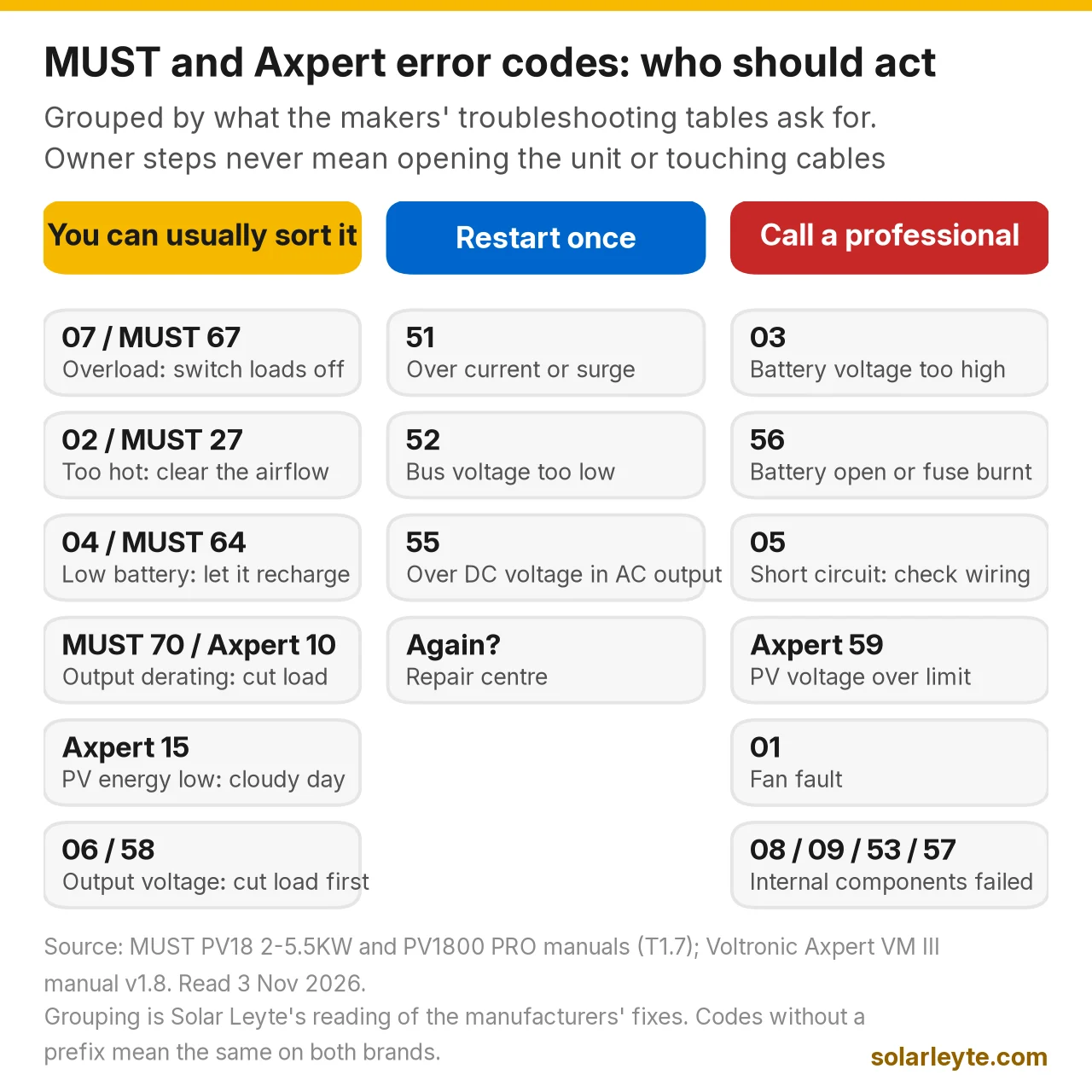
Photo the screen before you press anything.
MUST PV18 and PH18 error codes
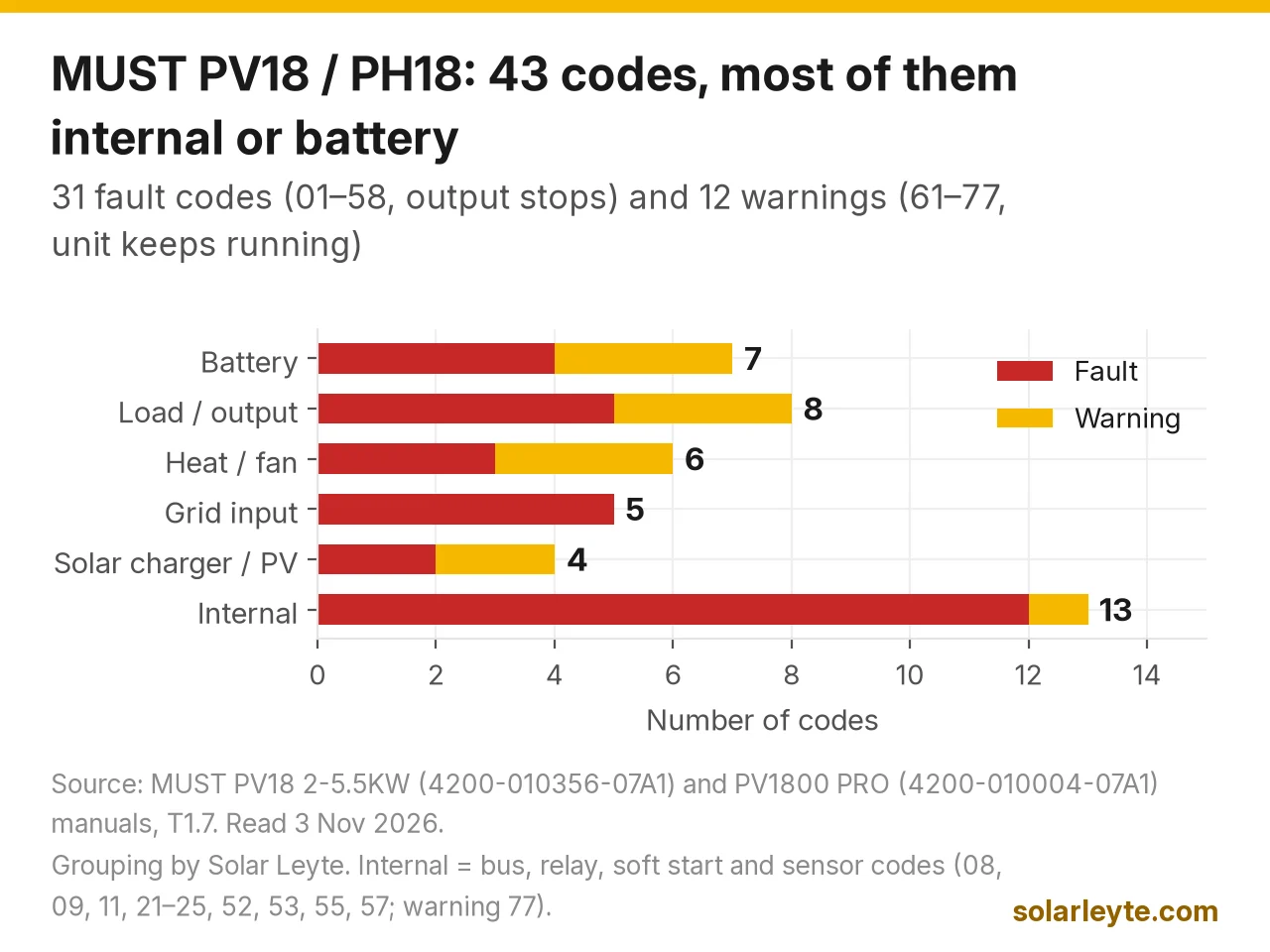
Both MUST manuals list the same 31 faults and 12 warnings. "What the manual says" is from MUST's troubleshooting table; "no fix given" means treat it as installer work. The "who acts" column is our advice.
Battery codes
Code | MUST's meaning | What the manual says | Who acts |
|---|---|---|---|
03 | Battery voltage is too high | Battery over-charged: return to repair center; check the spec and quantity of batteries meet requirements | Installer |
04 | Battery voltage is too low | Low battery (troubleshooting): re-charge battery, or replace battery | You first (let it recharge), then electrician |
31 | Solar charger battery voltage class error | No fix given | Installer |
56 | Battery connection is open | Battery not connected well or fuse is burnt. If the battery is connected well, return to repair center | Electrician (DC side) |
63 (warning) | Battery is over-charged | No fix given | Installer if it repeats |
64 (warning) | Low battery | No fix given | You: cut the load, let it recharge |
72 (warning) | Solar charger stops due to low battery | No fix given | You, then installer if it repeats |
Load and output codes
Code | MUST's meaning | What the manual says | Who acts |
|---|---|---|---|
05 | Output short circuited | Check if wiring is connected well and remove abnormal load | You (unplug loads), electrician for wiring |
06 / 58 | Output voltage high / too low | Output below 202 Vac or above 253 Vac: reduce the connected load, then return to repair center | You, then repair centre |
07 | Overload time out | Overloaded 110% and time is up: reduce the load by switching off some equipment | You |
51 | Over current protection error | Over current or surge: restart; if it happens again, return to repair center | You (one restart) |
67 / 70 / 74 (warnings) | Overload / output power derating / solar charger stops due to over load | No fix given | You: switch some loads off |
Heat and fan codes
Code | MUST's meaning | What the manual says | Who acts |
|---|---|---|---|
01 | Fan is locked when inverter is off | Fan fault; the PRO manual says replace the fan | Repair centre |
02 | Inverter transformer over temperature | Internal component over 90°C: check whether airflow is blocked or the room is too hot | You |
27 | Inverter radiator over temperature | No fix given | You (airflow), then installer |
61 / 62 / 75 (warnings) | Fan locked / fan 2 locked / solar charger over temperature | No fix given | Installer if it repeats |
Grid, solar and internal codes
Code | MUST's meaning | What the manual says | Who acts |
|---|---|---|---|
26, 41–44 | Grid over current; grid voltage low or high; grid under or over frequency | No fix given | Note when it happens; electrician if it repeats |
32 / 33 | Solar charger current sensor error / current uncontrollable | No fix given | Installer |
73 (warning) | Solar charger stops due to high PV voltage | No fix given | Installer (panel wiring) |
76 (warning) | PV charger communication error | No fix given | Installer |
77 (warning) | Parameter error | No fix given | Installer (settings) |
08 / 09 / 53 / 57 | Bus voltage too high / bus soft start failed / inverter soft start failed / control current sensor error | Internal components failed: return to repair center | Repair centre |
52 / 55 | Bus voltage too low / over DC voltage in AC output | Restart; if it happens again, return to repair center | You (one restart) |
11, 21–25 | Main relay failed; output, grid and load sensor errors | No fix given | Repair centre |
About "error 56 reset": MUST's "reset setting" menu resets settings. It won't fix a loose battery cable or burnt fuse, which is what 56 points to, and could undo your installer's battery settings.
Axpert (Voltronic) error codes
Voltronic Power makes the Axpert line. This table is from the VM III manual (16 faults, plus warnings that reuse some numbers).
Code | As a fault (red LED solid) | As a warning (red LED flashing) | What the manual says (fault) |
|---|---|---|---|
01 | Fan locked when inverter is off | Fan locked when inverter is on | Fan fault: replace the fan (repair centre) |
02 | Over temperature | Over temperature | Internal component over 100°C: check airflow and room temperature |
03 | Battery voltage too high | Battery over-charged | Return to repair center; check battery spec and quantity |
04 | Battery voltage too low | Low battery | Low battery: re-charge or replace battery |
05 | Output short circuit, or converter over temperature | – | Check wiring, remove abnormal load; converter over 120°C: check airflow |
06 / 58 | Output voltage too high / too low | – | Output below 190 or above 260 Vac: reduce load, then repair centre |
07 | Overload time out | Overload | Reduce the load; if PV voltage is over spec, output is derated, so reduce panels in series |
08 / 09 / 53 / 57 | Bus voltage too high / bus soft start failed / inverter soft start failed / current sensor failed | – | Internal components failed: return to repair center |
51 / 52 / 55 | Over current or surge / bus voltage too low / over DC voltage in AC output | – | Restart; if it happens again, return to repair center |
59 | PV voltage over limit | – | Reduce the number of PV modules in series (installer) |
10 | – | Output power derating | – |
15 | – | PV energy is low | – |
16 | – | High AC input (over 280 Vac) during bus soft start | – |
32 | – | Lost contact between inverter and remote display panel | – |
The Axpert MKS II 5KVA manual adds faults 10 (PV over current), 11 (PV over voltage), 12 (DC-DC over current) and 56 (battery connection is open), with the same 56 advice as MUST. So 10 is a fault on the MKS II but a warning on the VM III.
Axpert 15 is only a warning on the VM III: "PV energy is low." Normal on a rainy Biliran afternoon.
Worked example: a long night brownout in Naval
This is an example to show how the codes connect, not a real case. A family has a MUST PH18-5248 PRO with a 48 V battery bank. A brownout starts at 7 pm and the aircon and ref stay on.
- Around midnight the screen flashes 64 (low battery). The unit is still running. What to do: switch off the aircon and anything you can live without till morning. That's all a 64 asks for.
- If the load stays on, the battery keeps dropping until 04 (battery voltage too low) shows and the output stops. What to do: nothing on the battery itself. Wait for the sun or for the grid to come back so the inverter can recharge it. MUST's troubleshooting for low battery is "re-charge battery", then "replace battery."
- Next sunny day the code doesn't clear, or the unit won't come on at all. Now it's electrician time. MUST lists "battery voltage is far too low" or reversed battery polarity for a unit that doesn't respond. Both are DC-side checks you shouldn't do yourself.
If you see 56 instead, the inverter can't see the battery at all (a loose connection or a burnt fuse). Don't wiggle battery cables. Book the electrician.
Brownouts and generators: the "grid" codes
When power comes back after a BILECO or LEYECO brownout, or when you run a generator into the inverter, you may see MUST 41–44 (grid voltage or frequency out of range) or the unit may stay in battery mode. MUST's troubleshooting table covers the second case: check if the AC breaker has tripped and the AC wiring is connected well; check if AC wires are too thin or too long; check that the generator is working well, or that the input range setting is right (MUST's specs show the "APL" appliance setting staying on the grid down to about 90 Vac, against 170 Vac on "UPS"). Changing that menu setting is fine if your installer agrees. Anything with the wiring is for the electrician.
When to call, and what to send
Call your installer or an electrician if a code returns after one restart, for battery codes (03, 31, 56), internal codes (08, 09, 11, 21–25, 53, 57), PV voltage codes (59, 73), or a breaker that keeps tripping. Send:
- a photo of the screen showing the code (and whether it was flashing),
- the model label (MUST or Axpert, model number and serial),
- what was running and whether there was a brownout.
To check panels yourself, see our multimeter guide. Deye codes are different: see our Deye error codes guide. To size a battery so 64 and 04 don't show every brownout, see inverter and battery backup for brownouts.
FAQ
What does error 04 mean on a MUST inverter?
"Battery voltage is too low." It's a fault, so output stops. MUST says re-charge the battery, or replace it. If it keeps coming back after a full day of sun, have an electrician test the battery.
How do I reset MUST error 56?
56 means "battery connection is open": a loose connection or burnt fuse. The manual has no button reset for it. An electrician checks the battery side; if it's connected well, MUST says return the unit to the repair centre.
What is Axpert error 08?
"Bus voltage is too high." Voltronic's troubleshooting table groups 08 with 09, 53 and 57 as "internal components failed: return to repair center." It's not something you can fix at home.
Is Axpert error 15 serious?
On the VM III it's a warning, "PV energy is low," and the unit keeps running. If it shows on bright sunny days too, ask your installer to check the panels.
Solar Leyte is run by MACC Systems & Energy Solutions Inc., a solar installer in Naval, Biliran.
Get a free solar quote from MACC
Planning an off-grid or hybrid system for brownouts? Send us a recent BILECO or LEYECO bill and we'll get back to you with a free, no-obligation written quote.
- Call/Text: 0955 723 5093
- Email: official@macc-inc.com
- Website: www.macc-inc.com
- Or use the site quote form: /quote
Related guides
- Grid-tie vs hybrid vs off-grid solar: which works in a brownout?
- Off-grid solar for island and farm homes in Eastern Visayas
Sources (all checked 3 November 2026)
- MUST manual download server (mustpower.com): MUST's own index of PV18/PV1800 user manuals. MUST's website lists sa@mustpower.com as its contact.
- MUST PV18 2–5.5 kW user manual, doc 4200-010356-07A1, T1.7 (PDF): safety instructions p. 1; Fault Reference Code pp. 20–21 (31 faults); Warning Indicator pp. 21–22 (12 warnings, 61–77); low loss voltage 90 Vac (APL, GEN) / 170 Vac (UPS) p. 23; Trouble Shooting p. 27.
- MUST PV1800 PRO 3/5.2 kW user manual, doc 4200-010004-07A1, T1.7 (PDF): same fault list pp. 19–20, warnings p. 21, Trouble Shooting p. 27 ("Replace the fan" for code 01).
- MUST PV1800 PRO series product page: models PH18-3024 PRO and PH18-5248 PRO.
- Voltronic Power, Axpert VM III user manual, version 1.8 (PDF): safety p. 1; red LED solid = fault, flashing = warning p. 13; Fault Reference Code and Warning Indicator p. 39; Trouble Shooting p. 43.
- Voltronic Power, Axpert VM II PF1 3–5KVA user manual, version 1.3 (PDF): fault codes 01–09, 51–53, 55, 57–59 and warnings p. 26 ("Battery is not connected" is a warning icon, not a numbered fault).
- Voltronic Power, Axpert MKS II 5KVA user manual, version 1.4 (PDF): extra faults 10, 11, 12 and 56 (battery connection is open; "battery is not connected well or fuse is burnt").
- Worked example: Solar Leyte illustration built from the MUST code meanings above, not a real case.