Most Deye hybrid inverter error codes are the inverter protecting itself, not a broken unit. On the single-phase models you'll find at Philippine solar sellers (the SUN-SG03LP1 and SG05LP1 series), Deye's own manual lists 19 codes. A few are normal events: F35 "No AC grid" shows during every brownout, and F13 "Working mode change" usually clears on its own. Several more you can deal with yourself without touching any wires: F18, F20 and F34 mean too much load, F56 means the battery is too low, and F64 means the inverter is too hot. The rest, especially F23, F24 and F58, point at wiring, earthing or battery communication, and those are a job for your installer.
This guide goes through every code in Deye's current manuals, what each one means for a home in Leyte or Biliran, and what you can safely do before you pick up the phone.
Last checked: 17 October 2026. We read Deye's own user manuals that day: SUN-3.6/5/6K-SG03LP1-EU (2023 edition), SUN-3.6–8K-SG05LP1-EU (19 March 2026) and SUN-5–12K-SG04LP3-EU (19 March 2026). Code numbers can differ between models and firmware, so always match the code against the manual for your exact model.
First, a safety rule
A hybrid inverter has three power sources inside it: solar DC from the roof, battery DC, and grid AC. Deye's manual says the AC and DC circuits have to be disconnected separately, and that maintenance personnel must then wait 5 minutes before the unit is fully powered off. Turning off one breaker doesn't make it safe.
So in this guide, "owner can do it" only means things you can do without tools: reading the screen, switching off appliances, checking whether the whole street has a brownout, keeping the inverter's surroundings clear, and the switch-off, wait, switch-on restart Deye describes, if your installer has shown you which switches to use. Never open the cover, unplug solar or battery cables, or change battery settings yourself. Deye's warranty also excludes damage caused by "attempts to modify, alter or repair products."
Where to see the code
The centre icon on the Deye home screen normally shows the system is running. When it changes to "comm./F" plus a number, the inverter has a fault. Tap through to the System Alarms menu (on some screens, the Device Info page) to see the code, its name and the date and time it happened. Take a photo of that list before you restart anything, because your installer will want it.
Quick answer: what each Deye code means
These are the 19 codes in Deye's single-phase manuals (SG03LP1, 2023; SG05LP1, March 2026). Both list the same codes with the same wording. The "Who" column is our reading of Deye's own suggested fixes, not Deye's wording.
Code | Deye's name | What it means in plain English | Who |
|---|---|---|---|
F13 | Working mode change | Grid type, frequency or battery mode was changed; usually clears itself | Normal, then owner |
F35 | No AC grid | No power from the co-op: a brownout, or the grid breaker is off | Normal during brownouts |
F18 | AC over current fault of hardware | Too much load on the AC side | Owner: reduce load |
F34 | AC Overcurrent fault | Backup load over the allowed power | Owner: reduce load |
F20 | DC over current fault of the hardware | DC side over current, often a big load starting while off-grid | Owner first, then installer |
F56 | DC busbar voltage is too low | Battery voltage too low | Owner: let it recharge |
F64 | Heat sink high temperature failure | Inverter too hot | Owner: cool it down |
F42 | AC line low voltage | Grid voltage outside the setting | Owner checks, installer fixes |
F47 | AC over frequency | Grid frequency too high for the setting | Installer |
F48 | AC lower frequency | Grid frequency too low for the setting | Installer |
F29 | Parallel CANBus fault | Only on systems with two or more inverters linked | Installer if it stays |
F41 | Parallel system stop | One linked inverter is off | Installer if it stays |
F08 | GFDI_Relay_Failure | Earthing/neutral relay check failed | Installer |
F22 | Tz_EmergStop_Fault | Emergency stop | Installer |
F23 | AC leakage current is transient over current | Leakage current to earth | Installer if it stays |
F24 | DC insulation impedance failure | Solar wiring insulation to earth too low | Installer |
F26 | The DC busbar is unbalanced | Internal DC bus unbalanced | Installer if it stays |
F58 | BMS communication fault | Inverter lost contact with the battery's BMS | Installer |
F63 | ARC fault | Arc detection (Deye says for the US market) | Installer |
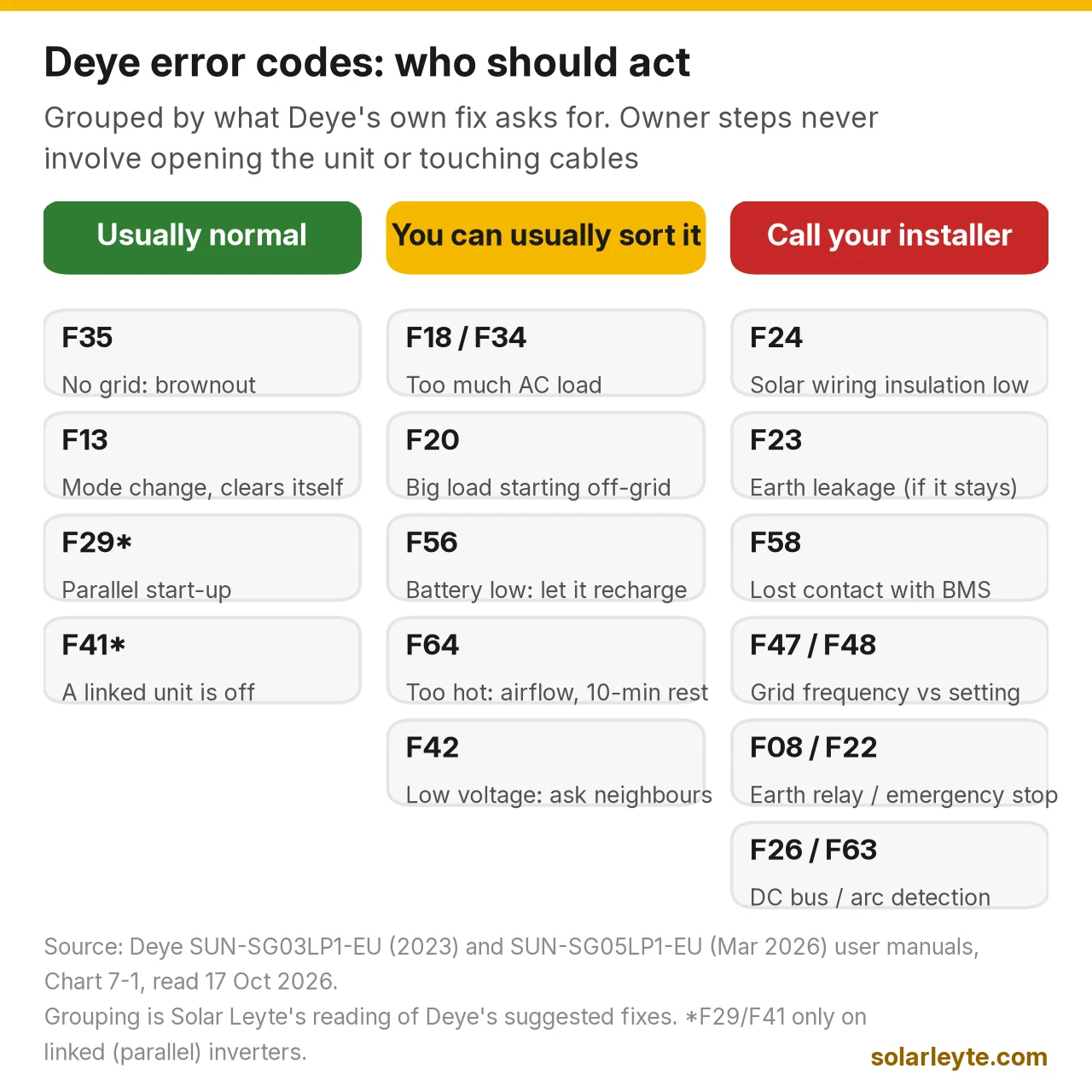
Source: Deye SG03LP1 and SG05LP1 user manuals, Chart 7-1 "Fault information".
Codes that are usually normal
F35: No AC grid (you'll see this in every brownout)
F35 means the inverter can't see the grid. Deye's steps are to confirm whether the grid is actually down, check the grid connection, and check that the switch between the inverter and the grid is on.
In Biliran and Leyte, the usual reason is simple: BILECO or your LEYECO co-op has a brownout, or the Visayas grid is on red alert with rotating outages. If your neighbours are dark too, F35 is just the inverter telling you the grid is gone. On a hybrid with a battery, your backup circuits keep running on battery and solar. It should clear when power comes back. If your neighbours have power and you still see F35, check the grid breaker feeding the inverter. If that's on, call your installer.
F13: Working mode change
Deye lists three triggers: the grid type or frequency was changed, the battery mode was changed to "No battery," or the work mode was changed on some older firmware. It says the code will "generally" disappear automatically. If it stays, Deye says to turn off the DC switch and AC switch, wait one minute, and turn them back on.
If nobody changed a setting and F13 keeps coming back, mention it to your installer. It can point to a settings or firmware question they should look at.
F29 and F41: only if you have two or more inverters
These only apply to parallel systems, where two or more Deye units are linked. Deye says F29 shows during start-up until every inverter is on, and F41 shows when one of the linked inverters is off. Most homes have a single inverter and will never see them.
Codes you can usually sort out yourself
F18, F34 and F20: too much load
F18 and F34 mean the AC side is overloaded. Deye's fix is to check that your backup and home loads are within the inverter's range. F20 is a DC-side over current, and Deye notes that in off-grid mode, "the inverter startup with big power load" may trigger it.
That fits what happens in a brownout here. The hybrid is suddenly running the house by itself, and someone switches on the aircon, a water pump or a flat iron. Deye's manual also warns that an aircon without a restart time-delay can trip the inverter's overload protection when power drops and comes back quickly, because the compressor needs 2 to 3 minutes before restarting.
What to do:
- Switch off the big loads on your backup circuit: aircon, pump, iron, kettle, microwave.
- For F18, Deye says to restart and check that it returns to normal. For F20, it's the one-minute DC and AC switch-off, then back on.
- Turn appliances back on one at a time, biggest last.
If it trips again with only small loads on, or F20 shows with the grid up, call your installer. F20's first listed check is the solar and battery connections, which is not an owner job. Our solar for aircon guide covers sizing a backup circuit so this happens less.
F56: battery voltage too low
Deye calls F56 "DC busbar voltage is too low" and its first explanation is "Battery voltage low." The fix is to let solar or the grid recharge the battery.
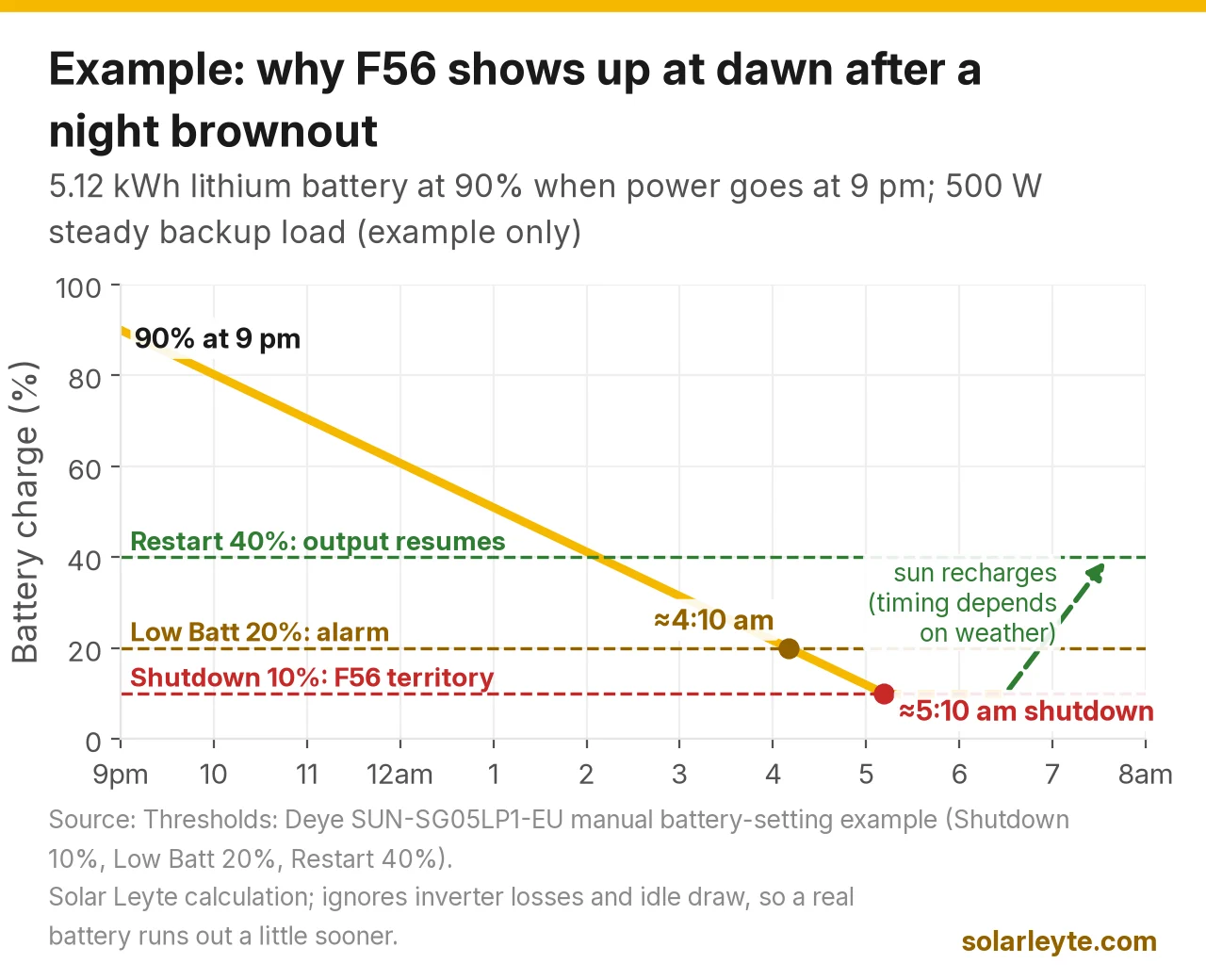
This is the code you'll most likely see at the end of a long night brownout. In the battery settings, the installer sets three levels. Deye's manual example for lithium batteries is: Shutdown 10% (the inverter shuts down below this charge level), Low Batt 20% (it raises an alarm), and Restart 40% (AC output resumes once the battery is back up to this level). Your installer may have set different numbers, so ask what yours are.
Worked example (example only, with assumptions): a 51.2 V, 100 Ah lithium battery stores 5.12 kWh. Say it's at 90% when a brownout starts at 9:00 pm, and your backup circuit draws a steady 500 W (a ref, fans, lights and Wi-Fi). It loses about 9.8% an hour, so it reaches the 20% alarm level at about 4:10 am, and it shuts down at 10% at about 5:10 am. This ignores the inverter's own losses and idle draw, so a real battery runs out a little sooner. Once the sun is up, the panels recharge the battery, and the house gets power again when it reaches 40%.
If F56 shows when the battery should be well charged, or the battery never seems to charge, call your installer. That can point to a battery, BMS or settings problem. Our solar battery price guide explains how to size a battery for longer brownouts.
F64: inverter too hot
F64 means the heat sink is too hot. Deye's steps are to check whether the surroundings are too hot and to turn the inverter off for 10 minutes, then restart.
The manual's install rules explain why it happens: no direct sunlight, about 50 cm of clear space at the sides, top and bottom, and 100 cm in front. The datasheet says the inverter starts reducing output above 45°C. An inverter boxed into a hot room, a cabinet or a west-facing wall in Leyte's afternoon heat is a likely F64 candidate. You can clear clutter and improve airflow yourself. Moving the inverter is installer work.
Grid voltage and frequency codes: F42, F47, F48
These mean the grid's voltage or frequency is outside what the inverter is set to accept. In the Philippines, the Distribution Code sets the grid at 60 Hz (59.7 to 60.3 Hz normally) and a household service voltage of 230 V ±10%, so 207 to 253 V. The SG05LP1 manual lists a voltage range of 0.85 to 1.1 times rated (about 196 to 253 V at 230 V, our calculation) and a 60 Hz setting of 55 to 65 Hz.
Two things to check:
- Is the co-op's power poor right now? Low voltage at the end of a long rural line, or as power returns after an outage, can trigger F42. If lights in the house look dim, ask your neighbours and report it to BILECO or LEYECO.
- Is the inverter set to 60 Hz? The Grid Setup menu has a 50 Hz or 60 Hz choice. A unit left on a 50 Hz setting is a settings problem for your installer, not something to change yourself, and changing it triggers F13 anyway.
Codes that mean "call your installer"
F24 (DC insulation impedance failure) means the insulation between the solar wiring and earth is too low. Deye's checks are the panel-to-inverter connections and the inverter's earth (PE) cable. Solar Analytica's guide to Deye codes says this can mean a damaged cable, water getting in, or a faulty panel or connector. If it shows up after heavy rain or a typhoon, treat it as a safety fault, don't touch the array, and book an inspection. Our typhoon checklist covers what to check after a storm from the ground.
F23 (leakage current) is leakage to earth. Deye says to check the solar-side earthing and restart 2 to 3 times. For the similar leakage code on three-phase units (F16), Solar Analytica notes that moisture in connectors or damp panels in the morning can set it off, and a one-off often clears. If it keeps coming back, it's the same family as F24: have the earthing and insulation tested.
F58 (BMS communication fault) means the inverter lost contact with the battery's management system. Deye's manual mentions you can turn off "BMS_Err_Stop" so the fault stops showing. We'd leave that to your installer: that setting is what makes the inverter stop when it can't hear the battery, so turning it off hides the warning rather than fixing the cable or battery.
F08, F22, F26 and F63 are less common. F08 is an earthing relay check that Deye ties to split-phase and three-phase wiring. For F22, the single-phase manual just says "contact your installer." F26 is an unbalanced internal DC bus; Deye links it to very uneven loads on split-phase or three-phase systems and says to wait, then restart 2 to 3 times. F63 is arc detection, which Deye says is for the US market. If any of them stays after a restart, it's installer work.
When you call, Deye's manual asks for five things: the inverter serial number, the distributor or service centre, the on-grid date, a description of the problem with the fault code and what the screen shows, and your contact details. A photo of the System Alarms list with dates and times answers most of this. Our Deye vs Solis vs SRNE comparison explains how Deye's warranty service works and why your installer or seller matters when you claim.
Three-phase Deye (SG04LP3): the numbers are different
If you have a three-phase Deye, usually a business or a large house, its 2026 manual uses a different list. It has 25 codes: 17 that match the single-phase list, plus 8 of its own. It doesn't list F08 or F35 at all.
Code | Three-phase only (SG04LP3) | What Deye says to do |
|---|---|---|
F01 | DC input polarity reverse fault | Check PV input polarity |
F07 | DC_START_Failure | Bus voltage can't be built from PV or battery; restart |
F15 | AC over current fault of software | Check that loads are in range; restart |
F16 | AC leakage current fault | Check PV cable earthing; restart 2–3 times |
F21 | Tz_HV_Overcurr_fault | Check PV input and battery current settings |
F46 | Backup battery fault | Check each battery's voltage, SOC and settings match |
F55 | DC busbar voltage is too high | Check battery voltage and PV input voltage |
F62 | DRMs0_stop | Check whether the DRM function is active |
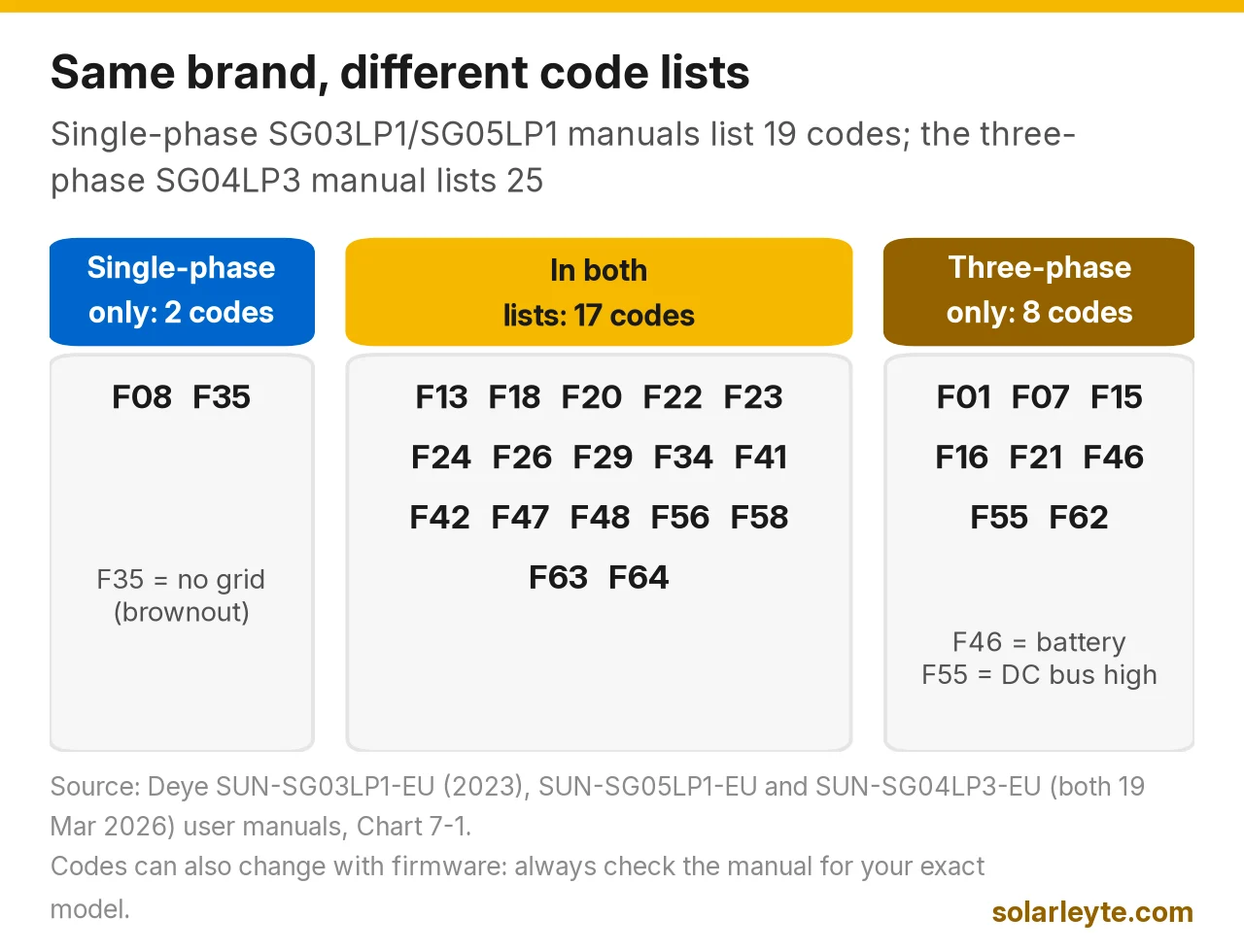
The meaning also changes for at least one shared code. On the three-phase unit, F22 is described as "Remotely shutdown," meaning the inverter is being controlled remotely. Solar Analytica also points out that codes can differ between firmware versions of the same hardware. So always read the code against the manual for your exact model number, which is printed on the inverter's nameplate label.
FAQ
Is F35 a problem with my Deye inverter? Usually not. F35 means "No AC grid." During a BILECO or LEYECO brownout it's expected, and it clears when power returns. If your neighbours have power and you still see F35, check the grid breaker to the inverter, then call your installer.
How do I reset a Deye inverter error? Many codes clear on their own once the cause is gone. For F13 and F20, Deye's manual says to turn off the DC switch and AC switch, wait one minute, and turn them back on. Only do this with the switches your installer has shown you, and never open the inverter. If the code comes back, write it down and call your installer.
Why does my Deye inverter show F56 in the morning? F56 means the battery voltage is too low. After a long night brownout, the battery can drain to the shutdown level your installer set (Deye's lithium example is 10%). Once the sun recharges it to the restart level (Deye's example is 40%), output comes back.
Can I turn off BMS_Err_Stop to stop the F58 error? Deye's manual says you can, but we wouldn't. That setting is what tells the inverter to stop when it loses contact with the battery's BMS. Turning it off hides the warning without fixing the cable, settings or battery behind it. Let your installer find the cause.
Are the error codes the same on every Deye inverter? No. The single-phase SG03LP1 and SG05LP1 manuals list the same 19 codes, but the three-phase SG04LP3 manual lists 25, including 8 that aren't in the single-phase list, and it drops F08 and F35. Check the manual for your exact model.
Solar Leyte is run by MACC Systems & Energy Solutions Inc., a solar installer in Naval, Biliran.
Get a free solar quote from MACC
Planning a hybrid system for brownouts, or want a second opinion on yours? Send us a recent electric bill, a photo of your roof and, if you already have an inverter, a photo of its label and the error screen. We'll get back to you with a free, no-obligation written quote.
- Call/Text: 0955 723 5093
- Email: official@macc-inc.com or benjie@macc-inc.com
- Website: www.macc-inc.com
- Office: Brgy. Talustusan, Naval, Biliran 6543
- Or use the site quote form: /quote
Related guides
- Grid-tie vs hybrid vs off-grid solar: which works in a brownout?
- Hybrid inverter prices in the Philippines
- How to choose a solar installer in Leyte and Biliran
- How long solar panels, inverters and batteries last
Sources (all checked 17 October 2026)
- Deye, SUN-3.6/5/6K-SG03LP1-EU user manual (2023 edition): Chart 7-1 fault table (19 codes), information to give your dealer, 5-minute wait after disconnecting AC and DC, warranty exclusions
- Deye, SUN-3.6–8K-SG05LP1-EU user manual (19 March 2026): same 19-code fault table; "comm./FXX" home-screen icon and System Alarms menu; battery Shutdown 10% / Low Batt 20% / Restart 40% example; aircon restart warning; 50 cm / 100 cm clearances, no direct sunlight; datasheet (0.85–1.1 Un, 60 Hz/55–65 Hz, derating above 45°C)
- Deye, SUN-5–12K-SG04LP3-EU user manual (19 March 2026): three-phase fault table (25 codes, no F08 or F35)
- Deye, manuals download page
- Meralco, Understanding Power Quality, citing the Philippine Distribution Code: 60 Hz (59.7–60.3 Hz), 230 V ±10% (207–253 V)
- Solar Analytica, Deye inverter fault codes: F24 causes (damaged cable, water ingress, faulty panel or connector), F16 leakage from moisture or damp mornings, code numbers varying by firmware