A beeping solar inverter is almost always a warning, not a breakdown. The four usual causes are: the grid just went off (a brownout), you're running more appliances than the inverter can carry, the battery is getting low, or the inverter is too hot or has lost contact with a lithium battery. The speed of the beep tells you which. On Growatt's SPF 6000 ES Plus and Voltronic's Axpert VM III, for example, one beep every 0.5 second means overload, one beep every second means low battery or a battery problem, and three beeps a second means a stuck fan. A steady, continuous beep with a solid red light means a fault, so the inverter has already shut its output off.
So, first move: look at the screen and take a photo of the code, then switch off the biggest appliance. If the beeping stops, it was overload. If it doesn't, read on.
Last checked: 19 November 2026, against the Growatt SPF 6000 ES Plus, Voltronic Axpert VM III, SRNE HFP, Luxpower SNA 3-6K and Deye SUN-3.6–8K-SG05LP1 user manuals. Beep patterns differ between brands and firmware, so always confirm with your own model's manual.
The first 2 minutes: what to do when it starts beeping
- Read the screen before touching anything. Note the number, whether the red light is flashing (warning) or solid (fault), and whether the grid is on or off.
- Photograph the code. A restart can clear it, and your installer will ask for it.
- Count the beeps for 10 seconds. Fast (2 per second), once per second, or twice every 3 seconds all mean different things (table below).
- Switch off the biggest load at the appliance: aircon, water pump, flat iron, rice cooker, kettle, welding machine.
- Check for heat or a smell. If the unit is very hot, smells burnt or you see smoke, turn off nothing else at the inverter, keep people away and call your installer or an electrician.
- Don't keep restarting. Growatt and Voltronic both say to return the unit for repair if certain faults come back after a restart.
What the beep pattern means (Growatt and Axpert-type)
Growatt's SPF series and Voltronic's Axpert series both list an audible alarm for every warning code, and many other off-grid all-in-one inverters use a similar system. Here are the ones homeowners hear most:
Beep pattern | Warning code | What it means | First thing to try |
|---|---|---|---|
1 beep every 0.5 second (fast) | 07 | Overload | Switch off the biggest appliance |
1 beep every second | 04 | Low battery | Cut loads; let solar or the grid recharge it |
1 beep every second | 03 | Battery over-charged | Call your installer (charge settings) |
3 beeps every second | 01 | Fan locked while the inverter is on | Check the fan isn't blocked; call for service |
2 beeps every 3 seconds | 10 | Output power derating (cutting power to protect itself) | Check ventilation and heat |
2 beeps every 3 seconds (Axpert VM III) | 15 | PV energy is low | Normal on cloudy days or late afternoon |
1 beep every second (Growatt SPF 6000 ES Plus) | 20 / 33 | BMS communication error / loss | Check the battery communication cable |
Continuous beep, red light on | Fault (e.g. 03, 05, 07, 51) | The inverter has stopped its output | Photograph the code; see the fault list for your brand |
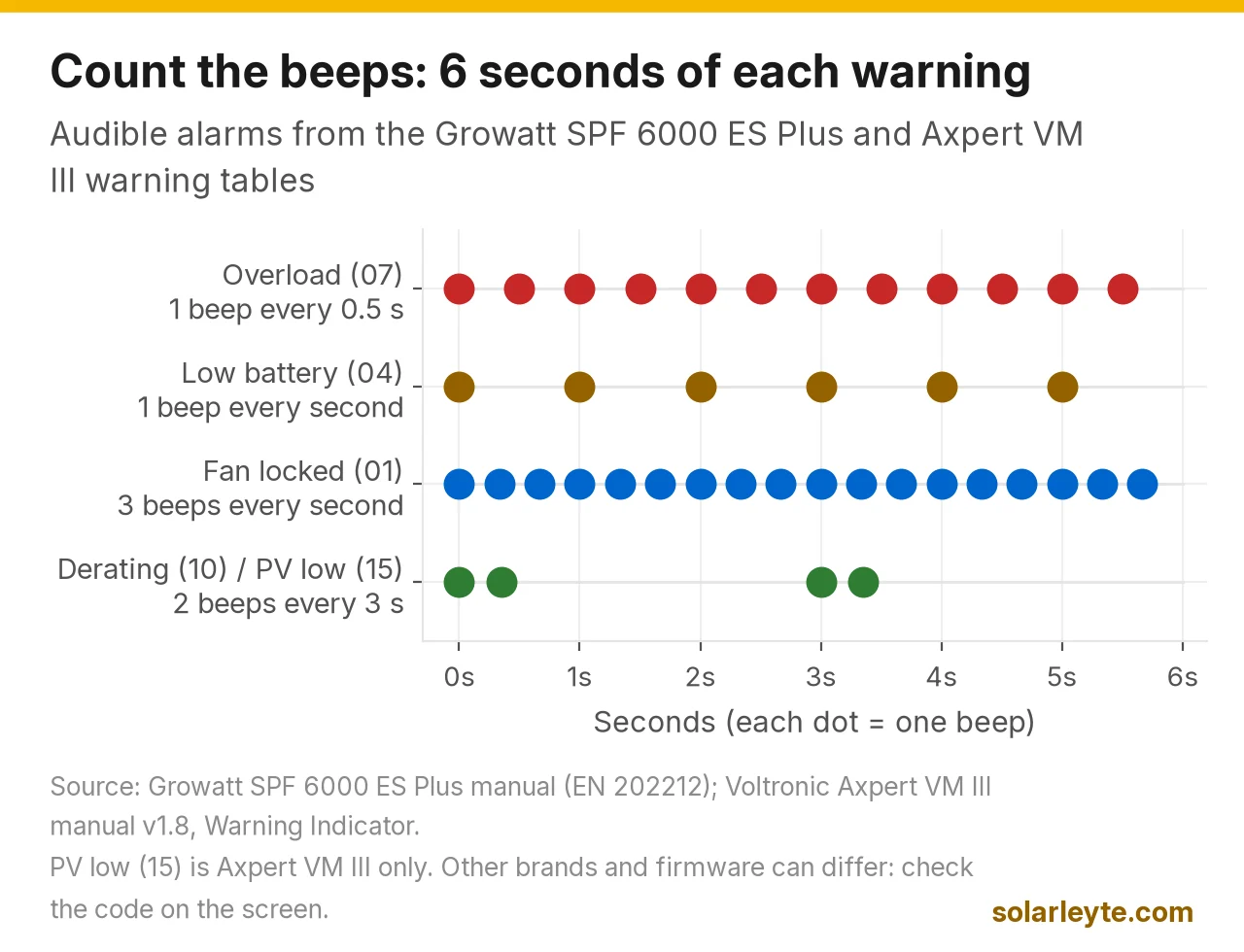
Sources: Growatt SPF 6000 ES Plus manual, Warning Indicator and Trouble Shooting; Voltronic Axpert VM III manual v1.8, Warning Indicator and Trouble Shooting.
The two brands don't agree on everything. Growatt's SPF 6000 ES Plus beeps once a second for over temperature (02), while the Axpert VM III lists no beep for the same warning. And on the Growatt, 19 (battery disconnect) makes no beep at all. That's why the pattern is a clue, not a final answer. The code on the screen is what counts.
For full code lists, see our brand guides: Growatt, MUST and Axpert, SRNE, Luxpower, Deye and Felicity.
Beeping after a brownout: usually normal
If the beeping starts the moment the lights flicker and stops a little later, the inverter is just telling you it lost the grid and switched to battery. Both manuals have a setting for exactly this:
- Growatt SPF 6000 ES Plus: program 17, "Beeps while primary source is interrupted" (alarm on by default).
- Axpert VM III: program 22, same name, alarm on by default.
- SRNE HFP: setting [26], "Beeps while primary source is interrupted"; ENA (default) beeps "when the status of the main input source changes".
In a week with a few co-op interruptions, you'll hear it every time. It's useful (it tells you you're now running on battery, so go easy on the aircon), but if it bothers you, that one setting can be turned off without silencing the other alarms.
One brownout trap: Deye's SG05LP1 manual warns that air conditioners need 2 to 3 minutes before they restart. If the power drops and comes back quickly and the aircon has no time-delay function, the inverter "will trigger overload fault and cut off output". If your inverter beeps and trips right after a short brownout with the aircon on, that's the likely reason. Turn the aircon off, let the inverter recover, then wait a few minutes before turning it back on. Our AVR guide covers why a short power cut is hard on compressors.
Beeping fast: overload
A fast beep (every 0.5 second on Growatt and Axpert units) means you're drawing more than the inverter's rated output. The manuals give it only seconds before it shuts down:
Inverter (rated output) | Overload limit before shutdown | Surge capacity |
|---|---|---|
Growatt SPF 6000 ES Plus (6 kW) | 10 seconds at 110–150% load; 5 seconds at 150% or more | 2 × rated power for 5 seconds |
Axpert VM III (1.5 / 3 / 5 kW) | 10 seconds at 105–130% load; 5 seconds at 130% or more | 2 × rated power for 5 seconds |
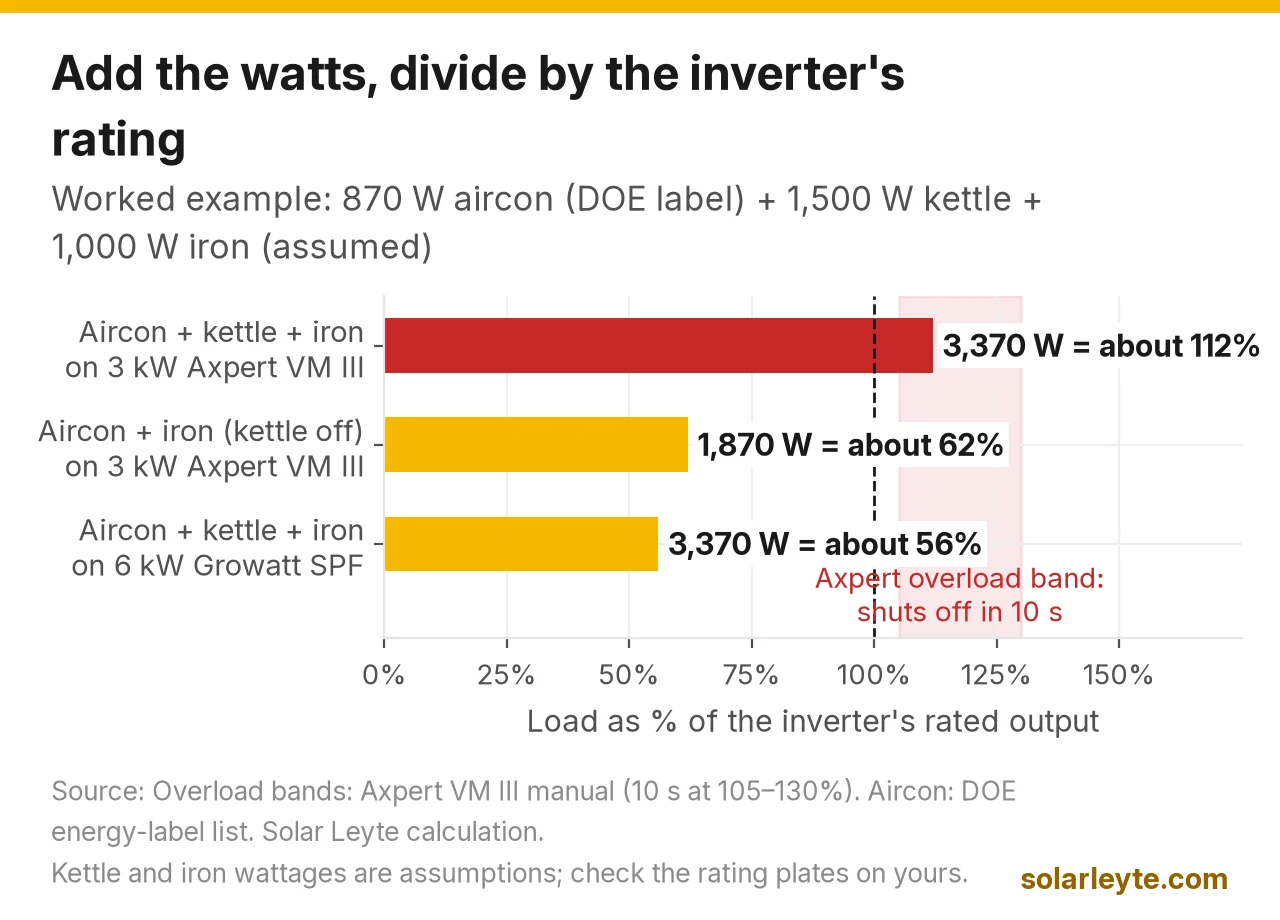
Sources: Growatt SPF 6000 ES Plus and Axpert VM III manuals, inverter mode specifications.
When time is up you get fault 07 ("overload time out") and the output cuts. Both manuals' fix is the same: "Reduce the connected load by switching off some equipment."
Worked example (assumed loads, labelled). A 3 kW Axpert VM III during a brownout runs:
- a 1 HP inverter aircon labelled 870 W by the DOE (Boston Bay ABT1122-1HPS, from the DOE's energy-label list),
- an electric kettle we assume is 1,500 W, and
- a flat iron we assume is 1,000 W (check the rating plate on yours).
Total: 870 + 1,500 + 1,000 = 3,370 W. Divided by 3,000 W, that's about 112% load, inside the 105–130% band, so by the manual the inverter has about 10 seconds before it shuts off. Unplug the kettle and the load drops to 1,870 W (about 62%), and the beeping should stop. The same 3,370 W on a 6 kW Growatt SPF 6000 ES Plus is only about 56%, so no alarm. That's the simple check: add up the watts you're running and divide by your inverter's rated watts.
Want to know how many kWh those appliances use over a month? Try our electricity calculator.
Overload bypass, a setting to know about. Growatt (program 18) and Axpert VM III (program 23) have "overload bypass", off by default. When it's on and the inverter overloads in battery mode, the unit transfers to line (grid) mode. SRNE's HFP has the same idea as setting [27], on by default. It only helps when the grid is there, so it does nothing during a brownout. Ask your installer before changing it.
Beeping once a second: low battery or a battery problem
On Growatt and Axpert units, a steady one beep per second with the red light flashing usually means warning 04, low battery. Growatt's troubleshooting table says: measure the battery voltage, check the battery's SOC on the screen if you use lithium, and recharge.
Each brand sets its own low-battery alarm point:
- Deye SG05LP1: "Low Batt" alarm at 20% SOC in the lithium example (shutdown at 10%, restart at 40%).
- SRNE HFP: setting [58], low SOC alarm, default 15%.
- Luxpower SNA 3-6K: "Bat low Buzzer Enable"; when it's on, the battery-low warning triggers the buzzer.
If it beeps for low battery every night, the battery is too small for your night loads, or the solar isn't refilling it. Our guides on a battery that's not charging and battery care go through the usual reasons.
Lithium battery link lost. The Axpert VM III manual says that with the battery type set to Pylontech, if no communication signal arrives for 3 minutes after the battery is connected, "buzzer will beep", and after 10 minutes the inverter stops charging and discharging the battery. If communication is lost after a good connection, it beeps immediately. Growatt's SPF 6000 ES Plus beeps once a second for BMS communication error (20) and loss (33). Check that the battery's communication cable is firmly in the right port, but leave BMS protocol settings to your installer.
Beeping when hot or in the afternoon
Two patterns point at heat:
- 3 beeps a second (warning 01): the fan is locked while the inverter is on. Growatt's fault 01 fix is "Check whether all fans are working properly" and "Replace the fan".
- 2 beeps every 3 seconds (warning 10): output power derating. The inverter is cutting its own power to protect itself.
Growatt lists fault 02 as internal temperature over 100°C, with the fix: check whether "the air flow of the unit is blocked or whether the ambient temperature is too high". Look for dust on the vents, boxes stacked against the unit, or an inverter mounted in a hot, closed room. Don't open the case.
How to turn off the beeping (and when you shouldn't)
Fix the cause first. Muting the buzzer doesn't fix an overload, it just means the next one surprises you. If you understand the risk and still want quiet, here's where each manual puts the switch:
Brand / model | Setting | What it does |
|---|---|---|
Growatt SPF 6000 ES Plus | Program 15 "Alarm control"; program 17 "Beeps while primary source is interrupted" | 15 silences alarms; 17 only silences the grid-loss beep |
Voltronic Axpert VM III | Program 18 "Alarm control"; program 22 "Beeps while primary source is interrupted" | Same split as Growatt |
SRNE HFP | [25] "Alarm enable"; [26] "Beeps while primary source is interrupted" | DIS turns each off; ENA is the default |
Luxpower SNA 3-6K | Setting 5 "Buzzer enable" (default) / "Buzzer Disable"; "Bat low Buzzer Enable" | Turns the buzzer or only the low-battery buzzer off |
Deye SUN-3.6–8K-SG05LP1 | Basic Setting → "Beep" | Turns the beep sound on or off |
Sources: each model's user manual (see Sources). Menu names can differ by firmware.
Our suggestion: if the grid-loss beep is the one that annoys you, turn off only that one (Growatt 17, Axpert 22, SRNE [26]) and leave the main alarm on. The overload and low-battery beeps are what save you from a sudden shutdown at 2 a.m. The WatchPower manual notes that with the buzzer off, alarms stay silent when a fault happens (see our WatchPower guide).
When to stop and call your installer
Call a qualified installer or electrician, and stop resetting, when:
- the beep is continuous with a solid red light and comes back after one restart,
- the code is 03 (battery over-charged), 05 (output short circuited), 06/58 (output voltage abnormal) or 51 (over current or surge) on Growatt or Axpert units,
- you see smoke, a burnt smell, melted cable insulation or a very hot battery,
- it beeps for low battery even with a full screen SOC, or
- it's beeping and the screen is blank: see inverter not turning on.
Don't open the inverter, and don't touch battery or PV cables. Solar panels make DC voltage whenever there's daylight, even when the inverter is off.
FAQ
Bakit tumutunog ang inverter ko pag brownout?
Normal yan sa karamihan ng hybrid at off-grid inverter. Ibig sabihin, nawala ang kuryente ng BILECO o LEYECO at lumipat ito sa battery. May setting para patayin lang ang beep na ito (Growatt program 17, Axpert program 22, SRNE [26]) nang hindi pinapatay ang ibang alarm.
Why is my solar inverter beeping at night?
Most often it's low battery (one beep a second on Growatt and Axpert units): your night loads are using more than the battery holds. Cut big loads, check the SOC on the screen, and look at whether the battery is fully charged by sunset.
Is a beeping inverter dangerous?
A warning beep (flashing red light) usually isn't. The inverter is still running and is telling you something. A fault (solid red, continuous beep) means it has already protected itself by shutting off the output. Heat, smoke or a burnt smell is the dangerous kind: keep away and call for help.
Why does my grid-tie inverter never beep?
Many grid-tie string inverters have no buzzer and report faults by light or app instead. Buzzers are common on hybrid and off-grid inverters with batteries. Check your app (FusionSolar, iSolarCloud, Solarman, ShinePhone) for the alarm.
Will turning off the buzzer damage the inverter?
No. It only stops the sound. The inverter still protects itself and still shows codes on the screen. You just won't hear the warning before a shutdown.
Solar Leyte is run by MACC Systems & Energy Solutions Inc., a solar installer in Naval, Biliran.
Get a free solar quote from MACC
Is your inverter beeping because the system is too small for how you use power now? Send us a recent BILECO or LEYECO bill and a photo of your inverter's label, and we'll get back to you with a free, no-obligation written quote.
- Call/Text: 0955 723 5093
- Email: official@macc-inc.com
- Website: www.macc-inc.com
- Or use the site quote form: /quote
Related guides
- Grid-tie vs hybrid vs off-grid solar: which works in a brownout?
- Growatt inverter error codes
- MUST and Axpert inverter error codes
- Solar inverter not turning on
- Brownout vs blackout in the Philippines
- Inverter battery backup for brownouts
Sources (all checked 19 November 2026)
- Growatt, SPF 6000 ES Plus user manual, EN 202212 (PDF): programs 15 (Alarm control), 17 (Beeps while primary source is interrupted) and 18 (Overload bypass, default disable); Warning Indicator with audible alarm per code (01 three beeps a second; 02, 03, 04, 20, 33 once a second; 07 every 0.5 second; 10 twice every 3 seconds; 19 no beep); Trouble Shooting (fault 01 replace the fan; 02 over 100°C; 03 return to repair centre; 04 recharge; 07 overload 110% and time is up); specs: 6 kW, overload 5 s at ≥150% and 10 s at 110–150%, surge 2 × rated power for 5 s.
- Voltronic Power, Axpert VM III user manual v1.8 (PDF): programs 18 (Alarm control), 22 (Beeps while primary source is interrupted) and 23 (Overload bypass); Warning Indicator (01 three beeps a second; 02 none; 03, 04 once a second; 07 every 0.5 second; 10, 15 twice every 3 seconds); Pylontech communication loss beep after 3 minutes, stop after 10 minutes; 1.5/3/5 kW models, overload 5 s at ≥130% and 10 s at 105–130%, surge 2 × rated power for 5 s; fault 07 overload time out, 51 over current or surge.
- SRNE, HFP4850S80-H manual v3.1 (PDF): settings [25] Alarm enable, [26] Beeps while primary source is interrupted, [27] Bypass output when overload (ENA default), [58] low SOC alarm 15% default.
- LuxpowerTek, SNA 3-6K off-grid user manual, UM-SNA01001E03 (PDF): setting 5 Buzzer enable (default) / Buzzer Disable; "Bat low Buzzer Enable".
- Deye, SUN-3.6–8K-SG05LP1-EU user manual, 19 March 2026 (PDF): Basic Setting "Beep"; lithium battery example Shutdown 10%, Low Batt 20%, Restart 40%; air conditioners need 2–3 minutes to restart, otherwise the inverter "will trigger overload fault and cut off output"; F18 AC over current.
- DOE, energy label issuances for air conditioners, Jan–Jun 2024 (PDF): Boston Bay ABT1122-1HPS, 870 W.
- Voltronic Power, Wi-Fi Module and WatchPower App User's Manual (PDF, MPP Solar copy): buzzer setting; with it off, alarms stay silent when a fault happens.
- L&R Renewables, Solar inverter red light or beeping?: "Many string inverters are silent, but hybrid inverters and battery systems often have a buzzer."
- Solar Leyte calculations (labelled in the text): 870 + 1,500 + 1,000 = 3,370 W; 3,370 ÷ 3,000 ≈ 112%; 1,870 ÷ 3,000 ≈ 62%; 3,370 ÷ 6,000 ≈ 56%. Kettle and iron wattages are assumptions.