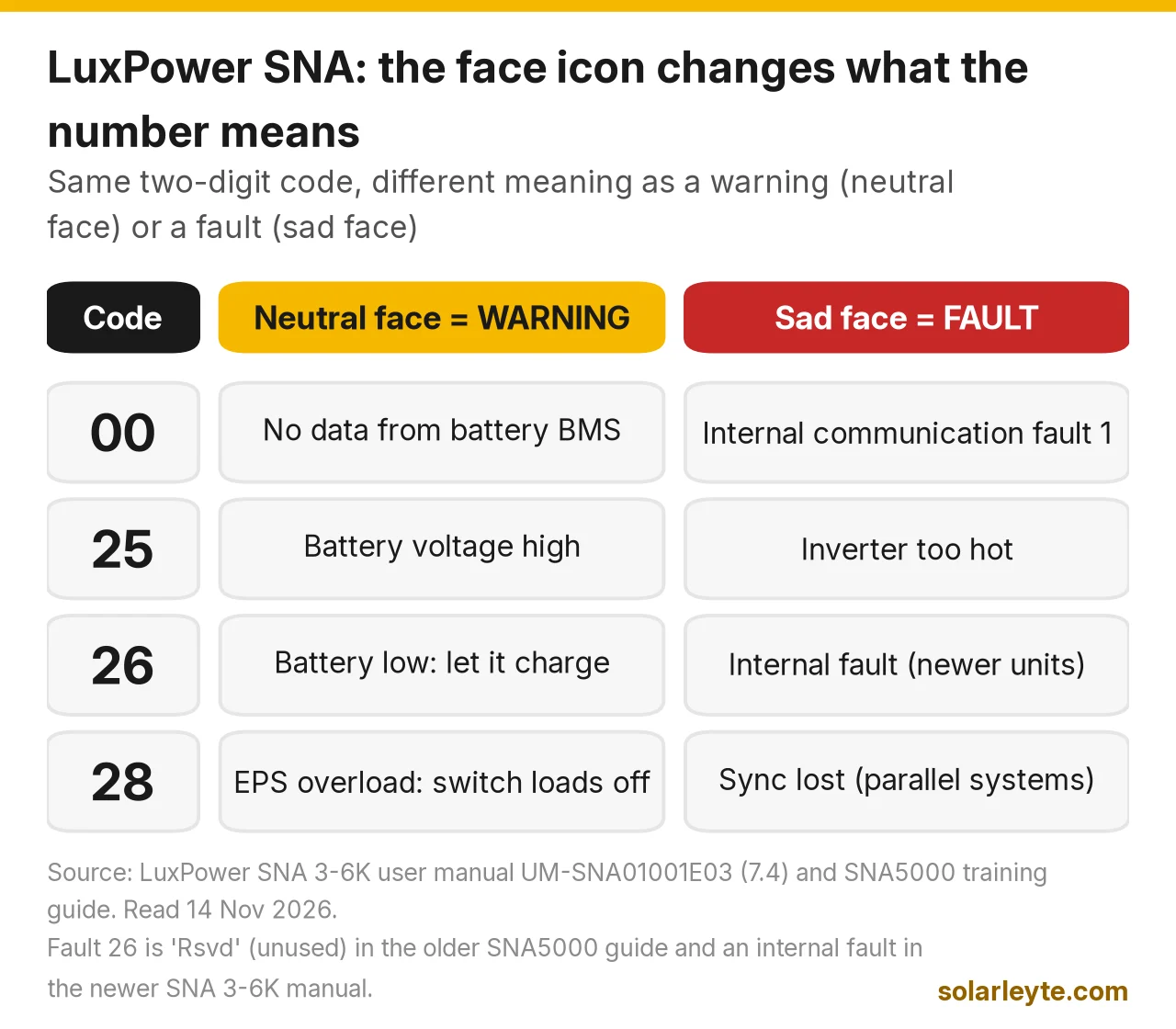
On a LuxPower SNA inverter, the number at the bottom of the screen only makes sense with the little face icon next to it. A smiling face means it's a normal status code, a neutral face means a warning, and a sad face means a fault. So "26" can mean two different things. These are the codes people search for most:
- 26 with a neutral face (warning): battery voltage low. Cut loads and let it charge.
- 27 (warning): battery open. The inverter can't see the battery. Check the battery breaker, or the battery has shut itself off.
- 28 (warning): EPS overload. Too much is plugged into the backup output.
- 25: as a warning, battery voltage high. As a fault, the inverter is too hot.
- 00: as a warning, no communication with the lithium battery. As a fault, an internal communication fault.
- 17 (fault): internal communication fault 2. Restart once. If it comes back, it's for the seller.
- 19 and 21 (faults): bus voltage or solar (PV) voltage too high. That's a panel wiring problem for the installer.
Last checked 14 November 2026 against LuxPower's SNA 3-6K off-grid user manual (version UM-SNA01001E03, 30 September 2025), its Eco Hybrid SNA 5K manual, its SNA5000 training and troubleshooting guide, the SNA 3-6K datasheet (29 July 2026) and the LXP 3-6K hybrid manual. Code lists differ a little between models and firmware, so match the code to the manual for your exact unit.
First, safety
An SNA brings solar DC (up to 500 V on the 3–6 kW models), 48 V battery DC and 230 V AC into one box. LuxPower's manual says: "All operations and wiring must be carried out by qualified professionals" and "Do not disassemble this equipment. For service, contact a qualified service center."
So below, "you" means no tools and no cables: read the screen, switch loads off, check breakers are on, clear the vents, let the battery recharge and do one restart. Cables, fuses, battery settings, panel strings and AC wiring are for a licensed electrician or your installer.
Which LuxPower do you have?
The model is on the label on the side of the unit.
Family | Example models | What it is | Code style on screen |
|---|---|---|---|
SNA (off-grid "Eco Hybrid") | SNA3000 WPV to SNA6000 WPV, older SNA5000 | 48 V off-grid inverter that can also take grid or generator power, indoor only (IP20), 2-year warranty on the datasheet | Two-digit number with a face icon (e.g. 26) |
LXP hybrid | LXP 3K to 6K Hybrid | Grid-tie hybrid with battery | Letter plus three digits (e.g. W017, E021) |
The two families use different lists (W016 on an LXP means "No AC connection"; warning 16 is unused on the SNA5000). Most of this guide is about the SNA, with a short LXP section near the end. For specs, see our LuxPower vs Growatt vs Deye comparison.
How to read the SNA screen
LuxPower's SNA5000 training guide explains it simply: "If with a neutral face icon, the inverter is in warning status... If a sad face icon is showing, the inverter is in fault status." It adds a note for when both icons show: refer to the fault code list.
A smiling face with a code like 40 or C0 is not an error. It's the working mode. These are the ones you'll see most:
Status code (smiling face) | LuxPower name | What it means |
|---|---|---|
04 | PV On-grid | Solar runs the loads, grid tops up |
11 | Bypass | Grid alone runs the loads |
19 | PV Charge + Bypass | Grid runs the loads, solar charges the battery |
20 | AC Charge | Grid runs the loads and charges the battery |
40 | Battery Off-grid | Brownout: the battery runs the loads |
C0 | PV&Battery Off-grid | Brownout: solar and battery together |
So "19" with a smiling face during the day is normal. "19" with a sad face is fault 19, bus voltage high. The icon is the whole difference.
Battery warnings: 00, 04, 25, 26 and 27
Code (neutral face) | LuxPower name | What it means | Who acts |
|---|---|---|---|
00 | Communication failure with battery | Inverter can't read the lithium battery's BMS | Installer: cable, port, protocol |
04 | Battery failure | The BMS says no charging and no discharging | Check the battery's own alarm; then battery seller |
25 | Battery voltage high | Battery above the normal range | Electrician |
26 | Battery voltage low | Battery is low (voltage or SOC) | You: cut loads, let it charge |
27 | Battery open | No battery seen by the inverter | You: is the battery breaker on? Then electrician |
Warning 26: battery low after a brownout
This is the most common LuxPower code in brownout country, and usually it isn't a fault. LuxPower's fix is: "Please check the setting of warning low voltage and SOC" and "Please check if the battery output is really low."
For a lithium battery that talks to the inverter, the SNA 3-6K manual gives these defaults (all settable):
SNA default (lithium, by SOC) | Setting |
|---|---|
Low battery warning | 20% SOC |
Warning clears at | warning SOC + 10% |
Output cut-off | 15% SOC (grid on or grid off) |
Output returns at | cut-off SOC + 10% |
For lead-acid it works on voltage instead: a 44.0 V warning and 42.0 V cut-off at light load, both set lower as the load rises.
Worked example A (illustration): a Naval home has a 5.12 kWh lithium battery on an SNA5000 with the default settings. During a long evening brownout the house draws about 300 W. At 20% SOC the screen shows warning 26. Between 20% and the 15% cut-off there's only about 5% of the battery left, roughly 0.26 kWh (5.12 × 0.05), which is about 50 minutes at 300 W. Then the output stops. It won't come back on battery until the SOC reaches 25% (15% + 10%), which means about 0.51 kWh has to go back in first. On a cloudy morning that takes a while, so the inverter looks stuck. It isn't. Those are our calculations from LuxPower's defaults, not a measured case.
If 26 shows every night, the battery is too small for your evening load or the settings are wrong for it (an installer job). Our solar battery not charging guide covers the charging side.
Warning 27: battery open
LuxPower's checks: is the battery connected, is the battery-side breaker on, and has the battery "run out and protected itself." A lithium battery drained flat in a brownout can switch itself off. The SNA 3-6K datasheet lists a "force wake up battery from PV&Grid" function; ask your installer how it's set up on your unit rather than guessing.
Warning 00: the battery isn't talking
00 means no data from the lithium battery's BMS. LuxPower's training guide lists four installer checks: the cable's pin layout at both ends (a plain network cable often won't work), the correct port (CAN or RS485), the DIP switches on the battery, and the battery protocol setting ("0.Standard 2.Pylon"), with the battery on LuxPower's compatible list.
Our battery brands comparison covers which brands document compatibility. Warning 04 is related: the BMS allows neither charging nor discharging. Check for an alarm on the battery itself, then contact the battery supplier.
Warning 25: battery voltage high
The training guide says to check the battery is within 40–59 V DC, and if not, "power off the battery and disconnect it from the system." The manual's high DC cut-off is 59 V for lithium. A 25 usually points to a wrong battery type or charge setting: electrician.
Overload and output warnings: 28 and 29
Warning 28 (EPS overload) means the backup output is carrying more than the inverter can give. LuxPower's checks: "if the EPS load is too high" and "if the PV and battery is not powerful enough to take the loads." The SNA 3-6K manual gives the limits:
SNA rule | What happens |
|---|---|
Surge capacity | 2 × rated power within 5 seconds (for motor starts) |
110% to 150% load | Overload protection after 10 seconds |
150% or more | Overload protection after 5 seconds |
Worked example B (illustration): an SNA5000 (5,000 W) is running a house at 4,000 W in a brownout when a pump and a second aircon start. If the total stays at about 6,000 W, that's 120%, so expect protection after 10 seconds; at 7,500 W (150%), 5 seconds. Our calculations. Don't keep resetting: move the big load off the backup circuit or run it only when the grid is on. Typical appliance watts are in our how many kWh appliances use post.
Warning 29 (EPS voltage high): LuxPower says to check whether a device with a big surge was running, and that "the recovery time will be 20minutes to remove this warning." So if it clears by itself after about 20 minutes, that's expected.
Grid and generator: warning 18
Warning 18 (AC frequency out of range) usually shows when the input is a generator whose speed is drifting. LuxPower's fix: "Power off the inverter and turn on the AC first to let the inverter self-adjust to the grid frequency." If it keeps happening on generator power, have the generator's frequency checked. Our transfer switch guide explains safe generator hook-ups.
The SNA's warning list has no grid-voltage code. Instead, in the default UPS input range, the manual's "low loss voltage" is 170 V ±7 V and the "high loss voltage" is 280 V ±7 V. So on an evening when the BILECO or LEYECO line sags below about 170 V, the SNA moves the house to battery even though the lights never fully went out. Our brownout vs blackout guide explains the voltage limits.
Heat and fan: warnings 09 and 13, fault 25
- Warning 09 (Fan Stuck): check the fan isn't blocked. The fans only run above about 300 W of battery or solar power, per the training guide, so a quiet fan at night isn't a fault. A dead fan is a service job.
- Warning 13 (over temperature): check the fans and vents, and "do regular cleaning for the dust filters."
- Fault 25 (temperature over range): the newer manual says to turn the inverter off for 10 minutes, then restart.
The SNA is indoor-only (IP20) and rated 0 to 50 °C (0 to 45 °C at full load), so a closed cabinet or a wall in afternoon sun can trip it.
Solar (PV) faults: 19, 21 and 24
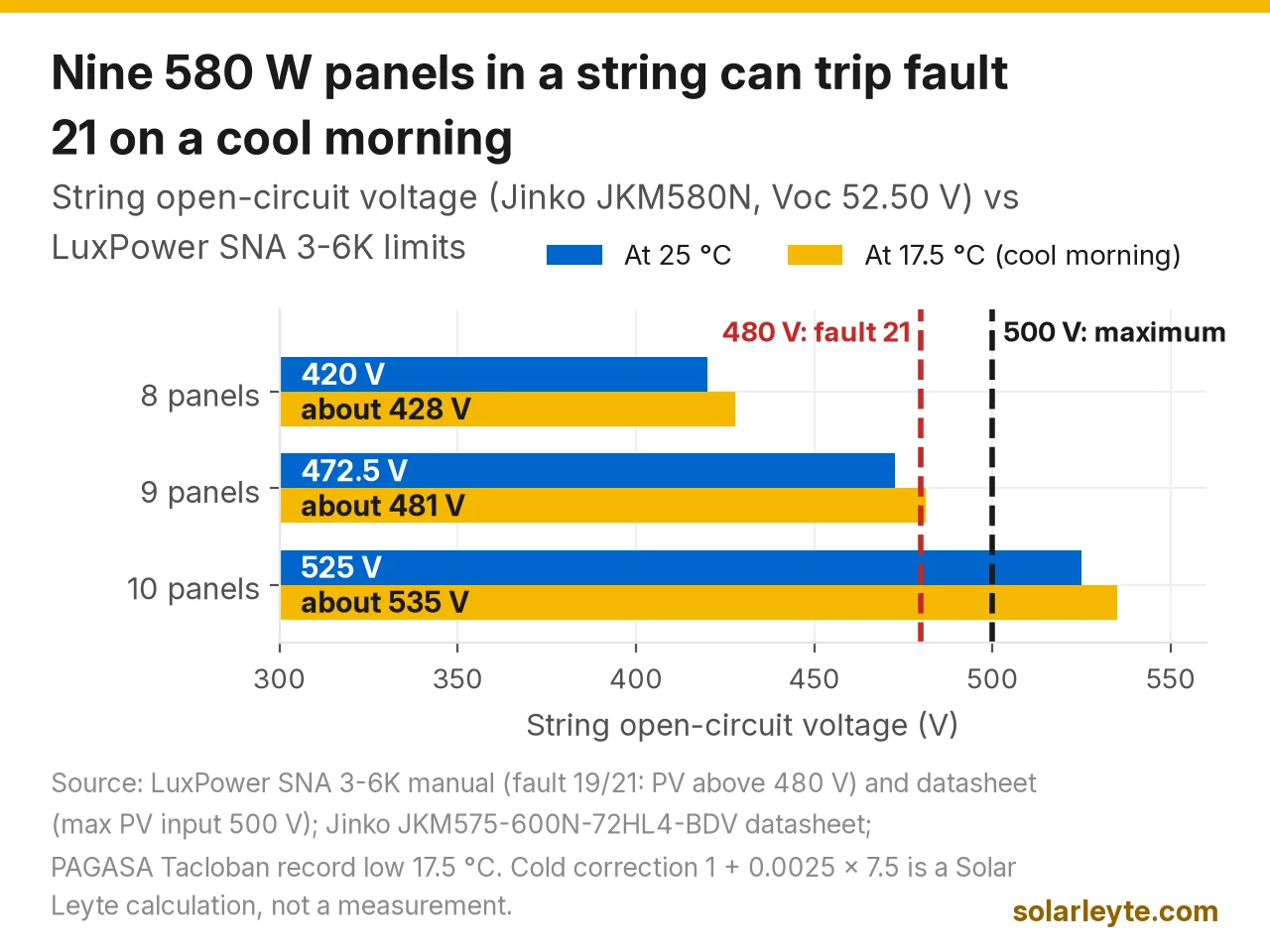
Fault 21 (PV voltage high) and fault 19 (bus voltage high) mean the panel strings are giving more voltage than the SNA can take. The SNA 3-6K manual says to check whether the PV input is "higher than 480V". The datasheet's absolute maximum is 500 V. LuxPower's advice for 21 is to switch off the PV input, check the voltage "and try to reduce the panels." So it's a design issue for the installer, not a reset. Fault 24 (PV short) is a wiring check with a multimeter, also for the installer.
Worked example C (illustration): using the Jinko JKM580N-72HL4-BDV (Voc 52.50 V, −0.25% per °C) from our series vs parallel wiring guide:
- 8 panels in series: 8 × 52.50 = 420 V at 25 °C. On a 17.5 °C morning (Tacloban's record low, PAGASA), 420 × (1 + 0.0025 × 7.5) = about 428 V. Well under 480 V.
- 9 panels in series: 472.5 V at 25 °C, and about 481 V on that same cool morning. That's over the 480 V the fault list names, though still under the 500 V maximum. Expect a possible 21 on cool, bright mornings.
- 10 panels in series: 525 V even at 25 °C. That's over the 500 V maximum and risks damage.
Those are our calculations. Your installer should run the same check with your panel's datasheet.
Internal and parallel faults
- Restart once, then the seller: 00 (internal communication fault 1), 02 (Bat On Mos fail), 03 (CT fail), 16 (relay fault), 17 and 18 (internal communication faults 2 and 3), 22 (internal over-current), 26 on newer units (internal fault, bus sample) and 31 (internal communication fault 4). For 17, LuxPower's own technicians check the ribbon cable between the MPPT and control boards and the firmware. That's inside the box, so it's not a DIY job.
- Parallel set-ups only: 08 (CAN communication), 09 and 10 (no master or more than one master), 11 (AC inconsistent), 13 (UPS reverse current), 15 (phase error), 28 and 29 as faults (sync signal lost). If you only have one inverter and see 08, LuxPower says the parallel setting should be "NO Parallel". Ask the installer to check.
- Fault 12 (output short circuit): switch off the loads, look for a damaged appliance or cord, then restart. If it comes back, call an electrician.
Note: the older SNA5000 training guide lists faults 26 to 30 as unused, while the newer manual uses 26 for an internal fault. So a sad-face 26 on a newer unit is not a low battery.
LXP hybrids: the E and W codes
LXP 3–6K hybrids show a letter and three digits. The ones that matter most at home:
- W016 (No AC connection) and W017 (AC voltage out of range): expected in a real brownout. If W017 keeps showing on evenings when the power is on, ask BILECO or your LEYECO to check your supply voltage.
- W026, W027, W028: battery low, battery open and UPS overload, as on the SNA.
- W020, W021, W030, E023, E024: earth faults, a reversed meter or CT, neutral and PV short faults. Electrician or installer.
When to call someone
- You can usually sort it: 26 (let it charge, cut evening loads), 28 (switch loads off), 29 (wait 20 minutes), 13 (clear the vents), 27 (check the battery breaker), 18 on a generator (restart with AC on first).
- Electrician or installer: 00 and 04 as warnings, 25 as a warning, 19, 21, 24, 12 if it comes back, and all parallel codes.
- Seller or LuxPower: 02, 03, 16, 17, 18, 22, 26 as a fault, 31, a dead fan, and anything that comes back after one restart.
When you call, have the model and serial number, a photo of the screen showing the face icon and the code, what was running at the time, the battery brand, and your panel count per string. LuxPower's warranty on the SNA WPV models is 2 years on the datasheet. Our LuxPower comparison covers how claims go through your distributor or installer. If it's out of warranty and you're thinking about a replacement or a bigger battery, you can request a quote and compare.
FAQ
What does error 26 mean on a LuxPower inverter?
With a neutral face icon, it's warning 26: battery voltage low. On lithium, the SNA warns at 20% SOC by default and cuts output at 15%. Let the battery recharge and cut loads. With a sad face on a newer SNA, 26 is an internal fault: restart once, then call the seller.
What is LuxPower error 17?
Fault 17 is "internal communication fault 2". Restart the inverter once. If it comes back, it needs the seller or LuxPower, because the fix involves the internal ribbon cable or firmware.
Ano ang warning 28 sa LuxPower?
EPS overload ang ibig sabihin. Sobra ang naka-saksak sa backup output. Patayin muna ang mga malalaking appliance (aircon, pump, plantsa), tapos i-on isa-isa. Kung paulit-ulit, ipa-check sa installer kung kasya ang load sa inverter.
Can I reset a LuxPower inverter myself?
You can do one restart for an overload or an internal code, and you can check that breakers are on. Don't open the unit or touch battery or PV cables. If the same code comes back, call your installer.
Solar Leyte is run by MACC Systems & Energy Solutions Inc., a solar installer in Naval, Biliran.
Get a free solar quote from MACC
Planning a hybrid or off-grid system for brownouts, or replacing an old inverter? Send us a recent BILECO or LEYECO bill and we'll get back to you with a free, no-obligation written quote.
- Call/Text: 0955 723 5093
- Email: official@macc-inc.com
- Website: www.macc-inc.com
- Or use the site quote form: /quote
Related guides
- Grid-tie vs hybrid vs off-grid solar: which works in a brownout?
- SRNE inverter error codes
- Growatt inverter error codes
- MUST and Axpert inverter error codes
- Solar inverter not turning on
Sources (all checked 14 November 2026)
- LuxpowerTek, SNA 3-6K off-grid single-phase user manual, UM-SNA01001E03, 30 Sep 2025 (PDF): safety notes (qualified professionals; do not disassemble); LCD status, warning and fault display (sections 4.2–4.3); specifications (PV input 100–480 V, MPPT 120–385 V; 5,000/6,000 W; overload 5 s at ≥150%, 10 s at 110–150%; surge 2× for 5 s; lithium SOC warning 20%, cut-off 15%, return +10%; lead-acid 44.0 V / 42.0 V with load steps; high DC cut-off 59 V Li / 60 V lead-acid; charge cut-off 58.4 V; low loss 170 V ±7 V (UPS), high loss 280 V ±7 V; 0–45 °C full load; IP20; 2 years) section 6; error list E000–E031 and W000–W031 section 7.4.
- LuxpowerTek, Eco Hybrid SNA 5K user manual (PDF): error list E000–E031 and W000–W031 (adds W001/W002 battery temperature).
- LuxpowerTek, SNA5000 training and troubleshooting guide, copy hosted by distributor Solarway Suppliers (PDF): face icons and status codes 0x00–0xC0; fault 00–31 and warning 00–31 tables with step-by-step checks (faults 26–30 "Rsvd"; warning 00 checks; warning 09 fan logic; warning 25 40–59 V; warning 29 20-minute recovery).
- LuxpowerTek, SNA 3-6K datasheet, 29 July 2026 (PDF): max PV input 500 V; battery 38.4–60 V; force wake-up battery from PV and grid; 0–50 °C; 2-year warranty.
- LuxpowerTek, LXP 3-6K Hybrid user manual 2.0 (PDF): troubleshooting based on LCD displays, E000–E031 and W000–W030.
- JinkoSolar JKM575–600N-72HL4-BDV datasheet (PDF): 580 W Voc 52.50 V, Voc temperature coefficient −0.25%/°C.
- PAGASA, Tacloban climatological extremes (PDF): record low 17.5 °C.
- Worked examples A–C: Solar Leyte illustrations built from the figures above, not real cases. Battery energy (5.12 kWh × 5% ≈ 0.26 kWh; ≈ 50 minutes at 300 W; 5.12 × 10% ≈ 0.51 kWh), overload percentages (6,000 W = 120%, 7,500 W = 150% of 5,000 W) and string voltages (8 × 52.50 = 420 V, ≈ 428 V at 17.5 °C; 9 × 52.50 = 472.5 V, ≈ 481 V; 10 × 52.50 = 525 V) are our calculations.