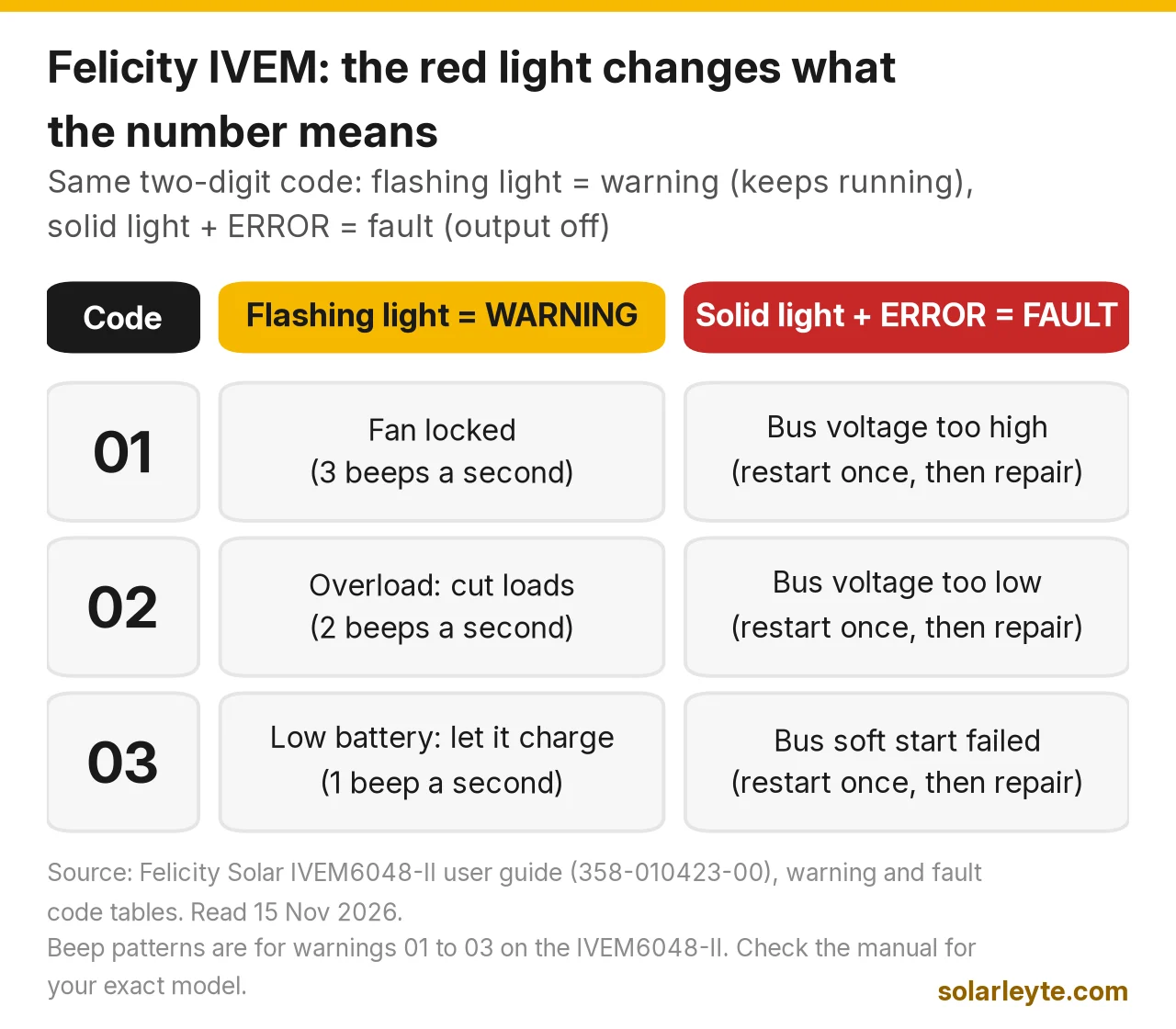
On a Felicity IVEM inverter, look at the red light before you look at the number. A flashing fault/warning light means a warning: the inverter keeps running and beeps. A solid light plus the word ERROR means a fault: the inverter has cut its output. The same number means different things in each case. These are the codes people search for most:
- Warning 01: fan locked. Fault 01: bus voltage too high.
- Warning 02: overload, switch some loads off. Fault 02: bus voltage too low.
- Warning 03: low battery, let it charge. Fault 03: bus soft start failed.
- Fault 10: overload timed out. Too much load for too long.
- Fault 13: PV voltage too high. Too many panels in one string.
- Faults 18 to 21: something inside is too hot. Check airflow.
- Fault 27: AC input and output wires swapped.
- Fault 34 / 35: DC/DC overcurrent, or overvoltage on the bus. Restart once, then call your installer.
- Warning 51 / 52: the battery's BMS has stopped charging or discharging.
- Warning 80: the inverter can't talk to the battery's BMS.
Last checked 15 November 2026 against Felicity Solar's IVEM6048-II user guide (document 358-010423-00), the IVEM3024 / IVEM5048 user guide (358-010045-10) and the IVEM8048-II / IVEM12048-II user guide (358-010386-01). Code lists can differ between models and firmware, so match the code to the manual for your exact unit.
First, stay safe
Felicity's manuals say only qualified people should install or service these units. Don't open the cover. Felicity's safety page says to switch off the DC and AC breakers and wait at least 5 minutes before touching any wiring, because parts inside stay charged.
What you can safely do as an owner: read the code, note whether the light is flashing or solid, switch off big loads, check that the vents aren't blocked, and do one restart. If the same fault comes back, stop and call your installer. The manuals say the same thing for most internal faults: "Restart the unit, if the error happens again, please return to repair center."
This guide covers Felicity's IVEM series. These are the off-grid inverter-chargers on Felicity's download page, like the IVEM3024, IVEM5048, IVEM6048-II, IVEM8048-II and IVEM12048-II. Felicity's hybrid IVGM range uses its own manuals, so check that list if you have one of those.
How to read the Felicity screen
The IVEM front panel has four lights: charging, utility bypass, inverter, and a fault/warning light.
- Warning: the fault/warning light flashes, and the screen shows the code plus a warning triangle. The inverter keeps working. It also beeps in a pattern that tells you which warning it is.
- Fault: the light stays solid, and the screen shows the code, the triangle and the word ERROR. Felicity's manual says the inverter "will cut off output" when this happens.
So "03" with a flashing light means your battery is low. "03" with a solid light and ERROR means a part inside failed during start-up. Totally different problems, same number.
The warning codes (inverter keeps running)
Warning | What the manual says | Beeps | What to do |
|---|---|---|---|
01 | Fan is locked | 3 times every second | Check the fan wiring; the fan may need replacing |
02 | Overload | Twice every second | Switch some loads off |
03 | Low battery | Once every second | Battery voltage is low; let it charge |
50 | BMS firmware version doesn't match | – | Battery firmware needs an update (installer job) |
51 | BMS doesn't allow the inverter to charge the battery | – | Normal when the battery is full or protecting itself |
52 | BMS doesn't allow the inverter to discharge the battery | – | Battery is empty or protecting itself; output from battery stops |
53 | BMS asks the inverter to charge the battery | – | The inverter charges it automatically |
54–65 | BMS detected something wrong | – | If it stays a long time, call your installer |
80 | BMS communication fault | – | Check the communication cable |
Beep patterns are from the IVEM6048-II warning table. Felicity's setting 19 can switch the buzzer off, but the warning still shows on screen.
The bigger IVEM8048-II and IVEM12048-II add a few warnings of their own: 04 (grid anomaly, with the grid icon blinking), 05, 06 and 08 (three-phase and parallel problems) and 07 (generator anomaly). On those models, warning 80 also beeps once a second.
Warning 03 and the low-battery voltages
Warning 03 is the one most brownout homes see at night. The battery has dropped to Felicity's low-battery alarm voltage. If the battery keeps dropping, the inverter shuts its output off at the low DC shutdown voltage.
What surprised us in the IVEM6048-II spec table is that the voltages depend on how much load you're running. Above half load, the inverter waits for a lower voltage before it alarms. That's because a battery's voltage sags more under a heavy load.
IVEM6048-II (48 V) | Load under 50% | Load 50% or more |
|---|---|---|
Low battery alarm (warning 03) | 45.0 V | 44.0 V |
Alarm clears at | 47.0 V | 46.0 V |
Low DC shutdown (output off) | 43.0 V | 42.0 V |
High DC alarm and fault | 62 V ± 0.4 V | 62 V ± 0.4 V |
The IVEM3024 (24 V) uses half those numbers: alarm 22.5 V / 22.0 V, shutdown 21.5 V / 21.0 V, high DC alarm 31 V. The IVEM5048 uses the same 48 V numbers as the 6048-II.
Worked example A: a lead-acid bank in Naval
Assumptions: an IVEM6048-II on four 12 V lead-acid batteries in series (48 V nominal), battery type set to self-defined with the default settings. This is an illustration, not a real case.
- Evening load of 1,200 W (fan, lights, TV, ref). That's 20% of 6,000 W, so the "under 50%" column applies. Warning 03 starts at 45.0 V, about 11.25 V per battery. Output shuts off at 43.0 V, about 10.75 V per battery.
- Someone switches on a 2.3 kW water heater too, so the load is now 3,500 W. That's 58% of 6,000 W, so the "50% or more" column applies. The alarm now waits for 44.0 V (11.0 V per battery), and shutdown is 42.0 V (10.5 V per battery). At 44 V, 3,500 W is roughly 80 A out of the battery before inverter losses, which is why the voltage sags fast.
So if your Felicity beeps once a second every brownout night, the fix is usually less load or more battery, not a new inverter.
Lithium batteries work differently. If the battery type is set to "Lib", setting 11 changes from a voltage to a state-of-charge cut-off. The default is 0%, and you can set it from 0% to 90%. At 0%, the inverter leans on the battery's own BMS to stop the discharge, and that's when you'll see warning 52. Ask your installer what reserve suits your battery and how often you get brownouts.
The manual also says not to pick "Lib" unless the battery is lithium and actually connected. If you do, the inverter may not run properly. A lithium battery that's asleep may also need waking up before you start the inverter.
Warning 80 and the BMS codes (51, 52, 53)
Warning 80 means the inverter has lost its data link to the battery's BMS. The manual only says to check the communication cable. There's one more thing worth knowing, though. The product overview in both the IVEM3024 and IVEM6048-II manuals says the BMS communication port "only supports Felicitysolar batteries."
So if you paired a Felicity inverter with another brand of lithium battery and plugged in the communication cable, warning 80 may never go away. Your installer can either use a Felicity battery with the cable connected, or run the other battery without the cable using voltage settings. In that case, the battery type is set to "self-defined", not "Lib", with charge and cut-off voltages taken from the battery maker's manual.
Codes 51 and 52 are the BMS telling the inverter what to do. They aren't inverter faults:
- 51: the BMS has stopped charging, usually because the battery is full, too hot or protecting itself.
- 52: the BMS has stopped discharging, usually because the battery is empty or protecting itself. Your appliances lose battery power until the sun or the grid comes back.
- 53: the BMS wants a charge, and the inverter starts charging by itself.
If 51 or 52 shows up when the battery should be half full, look in the inverter's BMS information page. It shows the battery's voltage, current, SOC, temperatures and BMS fault code. Write those down for your installer. For other battery problems, see our solar battery not charging guide.
Overload: warning 02 and fault 10
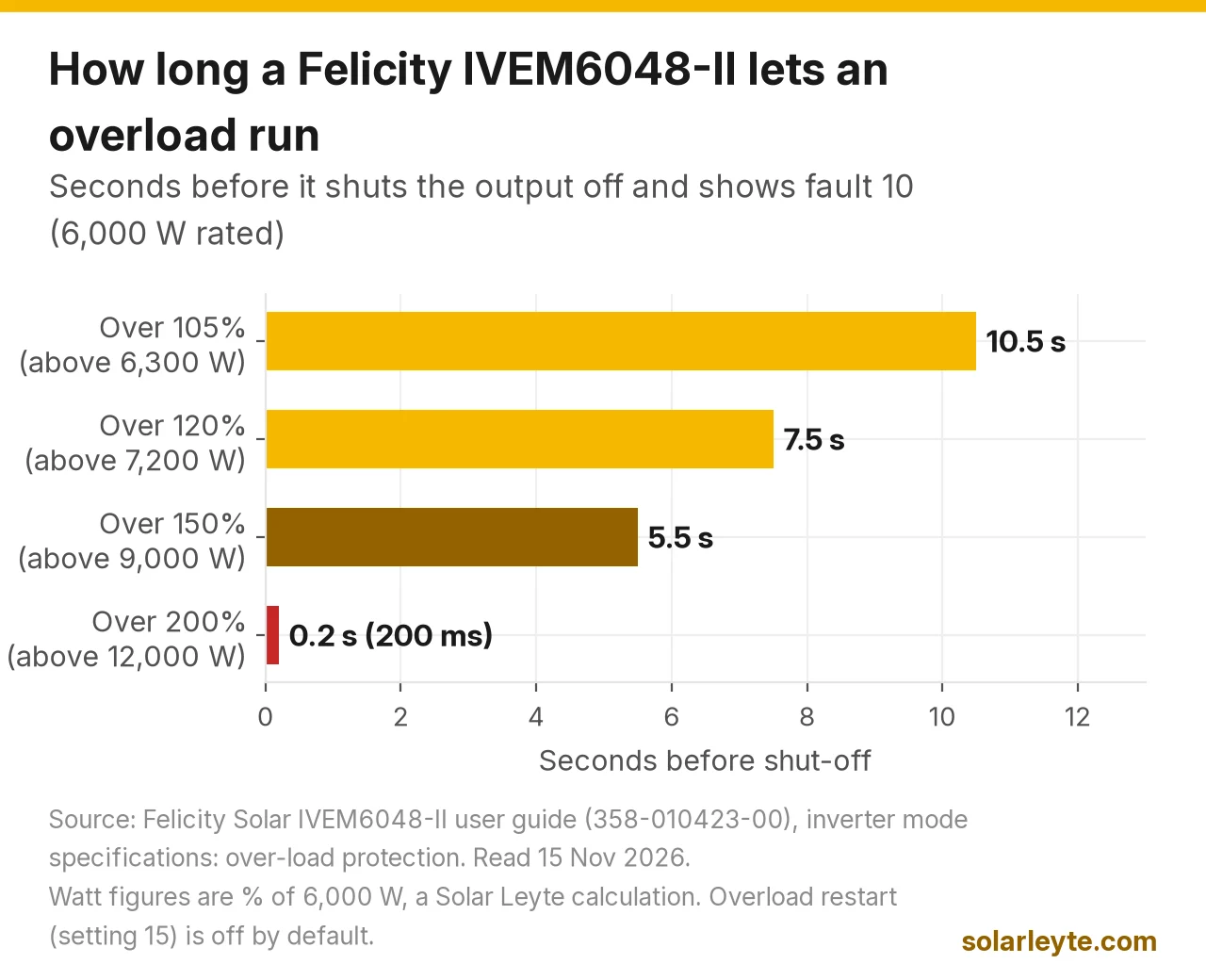
Warning 02 means you're over the inverter's rated power. If you don't cut loads quickly enough, the inverter shuts off and shows fault 10, "Overload time out". The IVEM6048-II spec sheet shows how long it waits:
Load on an IVEM6048-II | Time before it shuts off |
|---|---|
Over 105% (above 6,300 W) | 10.5 s |
Over 120% (above 7,200 W) | 7.5 s |
Over 150% (above 9,000 W) | 5.5 s |
Over 200% (above 12,000 W) | 200 ms |
The surge rating is listed as 2 × rated power for 5 seconds. The IVEM3024 is simpler: 10 seconds at 105–150% and 5 seconds at 150% or more.
Worked example B: the 6 kW unit and a pump
Assumptions: an IVEM6048-II already running 5,000 W of loads on battery. A water pump starts and the total jumps to 7,500 W. Illustrative figures, not a measurement.
7,500 ÷ 6,000 = 125%. That's over 120%, so the inverter allows about 7.5 seconds. A pump that settles down within a few seconds may ride through it. If the total stays at 7,500 W, you'll get fault 10 and the output goes off.
By default, the inverter won't restart by itself after an overload. Setting 15 ("Overload restart") is disabled from the factory. You'll need to cut loads and restart it. Setting 14 ("Overload bypass") can make it switch to grid power when it's overloaded on battery, but only when the grid is actually there. During a brownout, there's nothing to switch to.
For working out appliance watts before you buy or upgrade, see how many kWh your appliances use. If big motors are the problem, our AVR guide covers fridge and aircon start-up.
Heat codes: 17 to 21, 31 and 32
Fault 17 is a locked fan. Faults 18 to 21, 31 and 32 all say a part inside (PV converter, battery converter, inverter, or the general inside temperature) is "over the limitation". Felicity's fix is always the same: check that airflow isn't blocked and that the room isn't too hot.
The IVEM6048-II is rated to work at −10 °C to 50 °C, and the IVEM3024 at 0 °C to 55 °C. A closed bodega with a GI roof in April can get hot, though. Give the inverter space around its fans, keep it out of direct sun, and don't box it in.
By default, the inverter doesn't restart itself after an over-temperature fault either. Setting 16 is disabled from the factory. Let it cool, clear the vents, then restart once.
Solar panel codes: 13, 14, 15 and 16
Fault | Meaning | Felicity's fix |
|---|---|---|
13 | PV voltage too high | Reduce the number of panels in series |
14 | Short circuit at the PV port | Check the wiring |
15 | PV power is abnormal | Reduce the number of panels |
16 | Overcurrent at the PV port | Restart; if it repeats, repair centre |
The IVEM6048-II takes up to 500 V open-circuit from the panels and works between 90 V and 450 V. It needs at least 95 V to start, with a maximum of 7,500 W and 27 A in. The IVEM3024 also takes 500 V open-circuit, but it works between 120 V and 450 V, needs 125 V to start, and has a maximum of 4,000 W and 15 A.
Worked example C: how many 580 W panels per string?
Assumptions: Jinko 580 W panels (open-circuit voltage 52.50 V, temperature coefficient −0.25% per °C, from Jinko's datasheet) on an IVEM6048-II. We use PAGASA's record low for Tacloban, 17.5 °C, as a cool-morning case. Panel voltage rises as it gets colder, so we add 0.25% for every degree below 25 °C: 1 + 0.0025 × 7.5 = 1.01875. These are our calculations, not measurements.
- 8 panels: 8 × 52.50 = 420 V, about 428 V on a cool morning. Under 500 V.
- 9 panels: 9 × 52.50 = 472.5 V, about 481 V on a cool morning. Still under 500 V, but with little margin.
- 10 panels: 10 × 52.50 = 525 V, about 535 V on a cool morning. That's over 500 V, which means fault 13, and it risks the inverter.
Fault 15 ties in with the 7,500 W limit. 7,500 ÷ 580 is about 12.9, so 12 panels (6,960 W) is under the limit and 13 panels (7,540 W) is just over it. Your installer works out the exact string layout. For the basics, see series vs parallel solar panel wiring.
Wiring and grid codes: 27, 07, 08, 09
- 27, AC input and output wires connected the wrong way round. You'll see this right after a new install or a rewire. It's an installer fix, so don't swap wires yourself.
- 07, output voltage too low: reduce the load, then restart.
- 08, output voltage too high: restart, and call for repair if it repeats.
- 09, output short circuit: check the wiring and unplug any faulty appliance. A burnt extension cord or a wet outdoor socket is a common cause.
A brownout by itself doesn't make an error code. The IVEM switches from the grid to battery when the AC input falls below 170 V (± 7 V) in UPS mode, or 90 V (± 7 V) in Appliances mode. It switches back at 180 V or 100 V. The switch takes about 10 ms in UPS mode and 20 ms in Appliances mode. If your lights flicker on every small sag, ask your installer whether the input range setting suits your loads. If the grid voltage in your area is often low, ask BILECO or your LEYECO to check your supply.
Internal and parallel codes: 01–06, 11, 12, 22–26, 28, 29, 33–46
- 01–06 (bus voltage, soft start, overcurrent or surge), 12 (DC/DC overcurrent), 22–26 (current sensors), 29 (DC/DC soft start), 33–34 (overcurrent), 35 (overvoltage in the bus, "AC surge or PV surge or internal components failed"). For all of these, restart once, then call for repair if the code comes back. Fault 35 after a thunderstorm is worth mentioning to your installer. See our surge protection guide.
- 11, battery voltage too high: check the battery specs and how many batteries are in series. On a 48 V unit, the high DC fault is 62 V.
- 28 and 40–46: parallel-system codes (single unit set to parallel, lost CAN or sync data, mismatched firmware, output current not shared). These only matter if you have two or more inverters linked together.
When to call your installer, and what to have ready
Call when any fault (solid light + ERROR) comes back after one restart. Also call if warning 80 never clears, if you see 27 or 13 after new work, or if 51/52 show up when the battery should be fine. Have these ready:
- A photo of the screen showing the code, and whether the light was flashing or solid.
- The model and serial number from the sticker (for example IVEM6048-II).
- What was running when it happened, and the time.
- The battery brand and type, and whether a communication cable is connected.
- For lithium: the voltage, SOC and BMS fault code from the BMS information page.
Warranty claims go through the shop or installer you bought from. Felicity's user guides don't list warranty terms, so ask for the warranty in writing when you buy. If you're still choosing, our hybrid inverter price guide and battery brands comparison cover what to compare. If you'd like a qualified team to look at your system, you can request a quote.
If your Felicity won't switch on at all, start with solar inverter not turning on. For other brands, see our MUST/Axpert and SRNE code lists.
FAQ
What does error 03 mean on a Felicity inverter?
If the light is flashing and it beeps once a second, it's warning 03, low battery. Cut loads and let the battery charge. If the light is solid and the screen says ERROR, it's fault 03, bus soft start fail. That's an internal fault. Restart once, then call your installer if it comes back.
Ano ang ibig sabihin ng error 80 sa Felicity?
Ibig sabihin, hindi nakaka-usap ng inverter ang BMS ng battery. I-check muna ang communication cable. Ayon sa manual ng IVEM, Felicity batteries lang ang suportado ng BMS port. Kaya kung ibang brand ang battery mo, tanungin ang installer kung dapat bang naka-voltage settings na lang ito imbes na "Lib".
Why does my Felicity keep showing fault 10?
Fault 10 is "Overload time out". You ran more than the inverter's rating for too long: about 10.5 seconds above 105% on an IVEM6048-II, and less time at higher loads. Switch off big loads, then restart. By default, it won't restart by itself after an overload.
Can I reset a Felicity inverter myself?
You can switch it off and on once. Follow the manual's order and wait at least 5 minutes before touching any wiring. Don't open the case, and don't change battery or grid settings unless your installer tells you what values to use.
Solar Leyte is run by MACC Systems & Energy Solutions Inc., a solar installer in Naval, Biliran.
Get a free solar quote from MACC
Is your inverter beeping every brownout night, or are you planning a hybrid or off-grid system? Send us a recent BILECO or LEYECO bill and we'll get back to you with a free, no-obligation written quote.
- Call/Text: 0955 723 5093
- Email: official@macc-inc.com
- Website: www.macc-inc.com
- Or use the site quote form: /quote
Related guides
- Grid-tie vs hybrid vs off-grid solar: which works in a brownout?
- MUST and Axpert inverter error codes
- SRNE inverter error codes
- Solar battery not charging
- Off-grid solar for island and farm homes
- 12V vs 24V vs 48V solar systems
Sources (all checked 15 November 2026)
- Felicity Solar, IVEM6048-II user guide, document 358-010423-00 (PDF, Felicity Solar Australia site): safety guidance (qualified technicians; disconnect DC and AC breakers and wait 5 minutes); product overview (BMS communication port only supports Felicitysolar batteries); specifications (6,000 W; low line disconnect 170 V ± 7 V UPS / 90 V ± 7 V appliances, reconnect 180 / 100 V; transfer 10 ms UPS / 20 ms appliances; max PV open-circuit voltage 500 V, working range 90–450 V, max input power 7,500 W, max input current 27 A, start-up 95 V; overload >200% 200 ms, >150% 5.5 s, >120% 7.5 s, >105% 10.5 s; surge 2× rated power for 5 s; low battery alarm 45.0 / 44.0 V, recovery 47.0 / 46.0 V, low DC shutdown 43.0 / 42.0 V at load under / at least 50%; high DC alarm and fault 62 V ± 0.4 V; operating temperature −10 °C to 50 °C); settings 8 (battery type, "Lib" caution), 11 (low DC cut-off default 42.0 V, or 0% SOC with range 0–90% in Lib mode), 14 (overload bypass), 15 (overload restart, disabled by default), 16 (over-temperature restart, disabled by default), 19 (buzzer); warning code table (01, 02, 03 with beep patterns; 50–53, 54–65, 80); fault code table (01–29, 31–35, 40–46).
- Felicity Solar, IVEM3024 / IVEM5048 user guide, document 358-010045-10 (PDF): IVEM3024 max PV open-circuit voltage 500 V, working range 120–450 V, start-up 125 V, max input power 4,000 W, max input current 15 A; overload 5 s at ≥150% and 10 s at 105–150%; surge 2× rated power for 5 s; low battery alarm 22.5 / 22.0 V, shutdown 21.5 / 21.0 V, high DC 31 V; IVEM5048 48 V values; operating temperature 0–55 °C; BMS port only supports Felicitysolar batteries; same warning and fault code tables.
- Felicity Solar, IVEM8048-II / IVEM12048-II user guide, document 358-010386-01 (PDF): front-panel lights; warning shown with a flashing fault light, fault shown with a solid light and ERROR, and the inverter cuts off output; BMS information page; warning and fault code tables.
- Felicity Solar, Off-grid inverter downloads: the IVEM model list and user guides.
- JinkoSolar JKM575–600N-72HL4-BDV datasheet (PDF): 580 W open-circuit voltage 52.50 V, temperature coefficient −0.25% per °C.
- PAGASA, Tacloban climatological extremes (PDF): record low 17.5 °C.
- Worked examples A to C: Solar Leyte illustrations built from the figures above, not real cases. These are our calculations: per-battery voltages (÷ 4), the 1,200 W and 3,500 W loads (our assumptions, 20% and 58% of 6,000 W), about 80 A at 44 V, 7,500 W = 125%, string voltages (8 × 52.50 = 420 V, about 428 V; 9 × 52.50 = 472.5 V, about 481 V; 10 × 52.50 = 525 V, about 535 V at 17.5 °C), and 7,500 ÷ 580 ≈ 12.9 panels.