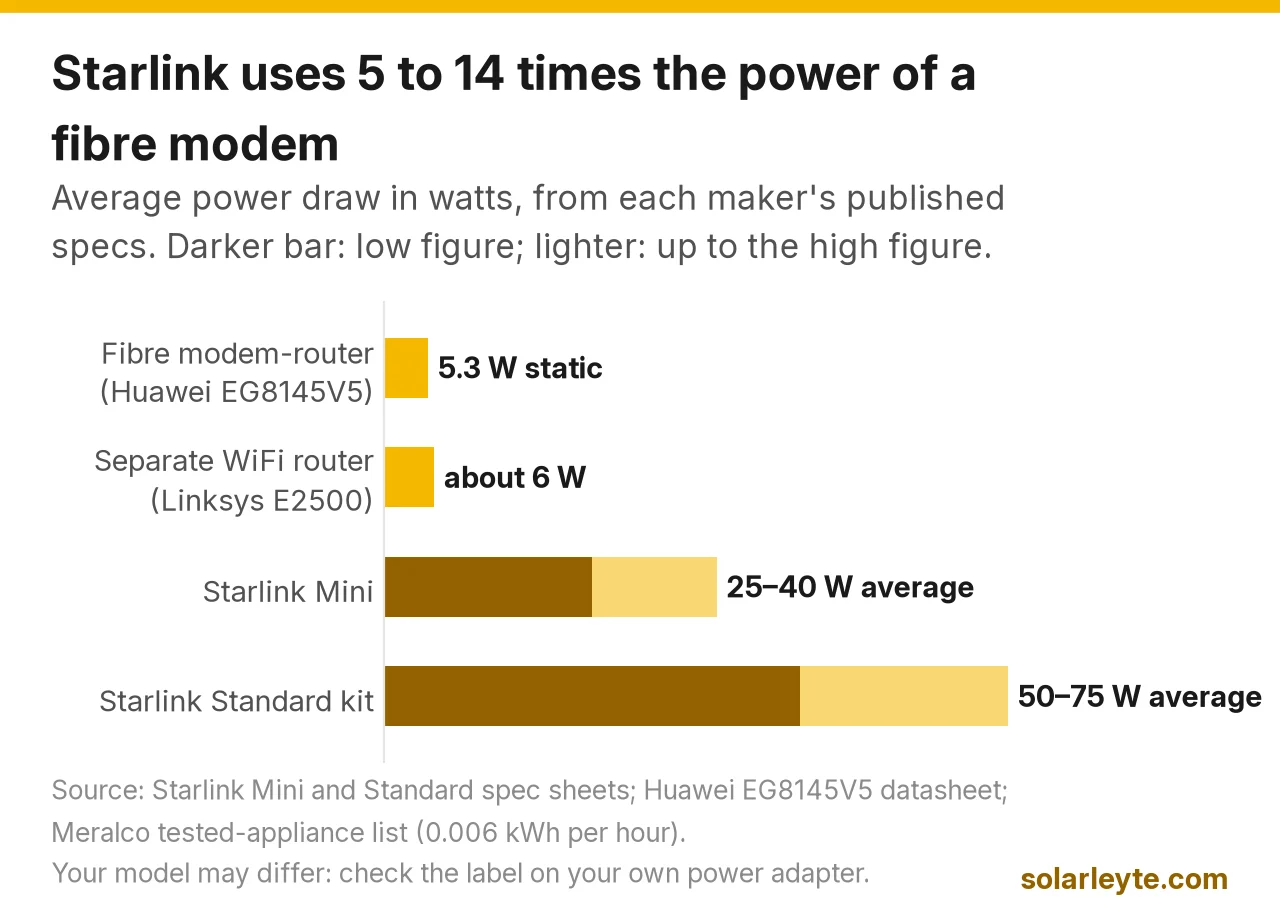
A fibre modem-router is a tiny load, about 5 W, so a mini DC UPS with a 32 to 38 Wh battery keeps it online for roughly 5 to 6 hours of brownout. Starlink is a much bigger load: Starlink's spec sheets put the Mini at an average of 25 to 40 W and the Standard kit at 50 to 75 W. That's 5 to 14 times a fibre modem, so a router-type mini UPS won't run Starlink for long. For Starlink you want a portable power station (about 300 Wh for a 4-hour evening brownout on a Mini, about 768 Wh to 1 kWh on a Standard) or your hybrid solar system's backup circuit.
Brownout na pud? With the Visayas grid on repeated yellow and red alerts this year (what the alerts mean for Biliran and Leyte), keeping the internet up matters for home workers, students and stores taking GCash. Here's the maths with real watts and real Philippine listings.
Last checked: 23 October 2026. Prices are listed prices on the dates shown and change often.
How many watts your internet actually uses
Start with the number on the label of your own modem or Starlink power supply. If you don't have it handy, these are the published figures.
Device | Average power | Where the number comes from |
|---|---|---|
Fibre modem-router (Huawei EchoLife EG8145V5) | 5.3 W static, 18 W maximum | Huawei datasheet |
Separate WiFi router (Linksys E2500) | about 6 W (0.006 kWh per hour of use) | Meralco tested-appliance list |
Starlink Mini | 25–40 W average; input 12–48 V, 60 W | Starlink Mini spec sheet |
Starlink Standard kit | 50–75 W average; runs on AC | Starlink Standard spec sheet |
Three things the table tells you:
- Your fibre modem barely registers. The Huawei EG8145V5, a dual-band fibre modem-router, lists 5.3 W static power and 18 W maximum, on an 11–14 V DC, 1.5 A supply (Huawei datasheet). Your ISP's model may differ, so check the sticker under it.
- Starlink Mini is the easier one to back up. Its spec sheet lists an average of 25–40 W, a DC input of 12–48 V at 60 W, and a USB-C Power Delivery requirement of "100W, 20V/5A Minimum" when used with Starlink's USB-C to barrel jack cable (Starlink Mini spec sheet). It has WiFi built in, so there's no separate router to power.
- Starlink Standard needs an AC outlet. Its spec sheet lists an average of 50–75 W, and the kit plugs into the wall through an AC cable (Starlink Standard spec sheet). In a brownout that means a power station's AC outlet, an inverter, or a hybrid solar backup circuit.
Mini UPS for a fibre WiFi router: real listings and real hours
A mini DC UPS is a small lithium battery box that sits between your modem's adapter and the modem. When BILECO or LEYECO power drops, it switches to battery. Here's what Philippine shops listed on 23 October 2026.
Model (as listed) | Seller | Battery (as listed) | 12 V output | Listed price |
|---|---|---|---|---|
SKE B300 | PowerCentral PH | 7,800 mAh | 12 V 2.5 A | ₱449.60 |
SKE POE-36E | Datablitz | 10,000 mAh (2,500 mAh × 4) | 12 V 3.0 A | ₱1,850 |
BAVIN PC1236 (18 W) | BAVIN PH | 8,800 mAh, 3.7 V, 32.56 Wh | 12 V 1 A | ₱1,949 |
BAVIN PC1237 (36 W) | BAVIN PH | 10,400 mAh, 3.7 V, 38.48 Wh | 12 V 2 A | ₱2,999 |
Panther PUD 362 | Panther PH | Not listed | 12 V 2 A | ₱2,490 |
mAh is not the number that matters. Wh is. A "10,400 mAh" rating is measured at the lithium cell's own voltage (BAVIN says 3.7 V), not at the 12 V your modem uses. BAVIN does the honest maths for you: 10,400 mAh × 3.7 V = 38.48 Wh. When a seller lists only mAh, multiply by 3.7 V and divide by 1,000 to get Wh. That's our assumption for typical lithium-ion cells; ask the seller to confirm.
Watch the 12 V amps. The Huawei modem above uses a 1.5 A adapter. The BAVIN PC1236's 12 V port is rated 1 A (12 W), which is below the modem's 18 W maximum. The PC1237 (2 A), SKE units (2.5 to 3 A) and Panther (2 A) have more headroom. Match the UPS's 12 V amps to at least your modem adapter's amps.
How long each one lasts (Solar Leyte estimates)
We used the same rule as our power station comparison: hours = Wh × 0.85 ÷ watts, where 0.85 allows for conversion losses. Two loads: the fibre modem alone (5.3 W) and the modem plus a separate Linksys-class router (5.3 + 6 = 11.3 W).
Mini UPS | Wh (listed or our estimate) | Fibre modem only (5.3 W) | Modem + router (11.3 W) |
|---|---|---|---|
SKE B300 | about 28.9 Wh (7,800 mAh × 3.7 V, our estimate) | about 4.6 hours | about 2.2 hours |
SKE POE-36E | about 37 Wh (10,000 mAh × 3.7 V, our estimate) | about 5.9 hours | about 2.8 hours |
BAVIN PC1236 | 32.56 Wh | about 5.2 hours | about 2.4 hours |
BAVIN PC1237 | 38.48 Wh | about 6.2 hours | about 2.9 hours |
What this means:
- For a 4-hour evening brownout like NGCP's 5–9 pm window on 26 August (GMA News), any of these covers a fibre modem alone. With a second router, you're down to 2 to 3 hours.
- For a 13-hour outage like the NGCP maintenance shutdown that cut BILECO's whole franchise area on 8 August from 5 am to 6 pm (details in our battery guide), no mini UPS here is enough. The modem alone needs about 81 Wh (5.3 × 13 ÷ 0.85). That's a small power station's job.
- Check claims against the maths. Panther says its PUD 362 lasts "up to ~13 hours, depending on the load". On a 5.3 W modem, 13 hours needs about 81 Wh of battery, and Panther doesn't list the capacity, so ask the seller for the Wh before you count on it. Another listing we saw sold a "14 to 24 Hours" version for ₱2,995 with no capacity at all; 14 hours on 5.3 W needs about 87 Wh. The SKE B300's title also says "16000mAh LiFePO4" while its description says 7,800 mAh lithium. We used the description and flagged it.
Starlink in a brownout: power station sizes
A router-type mini UPS tops out at 18 to 36 W of output and about 30 to 40 Wh of battery, so it can't carry a Starlink Standard and would only run a Mini for about an hour. Use a power station, a 12 V battery for the Mini, or a hybrid solar system.
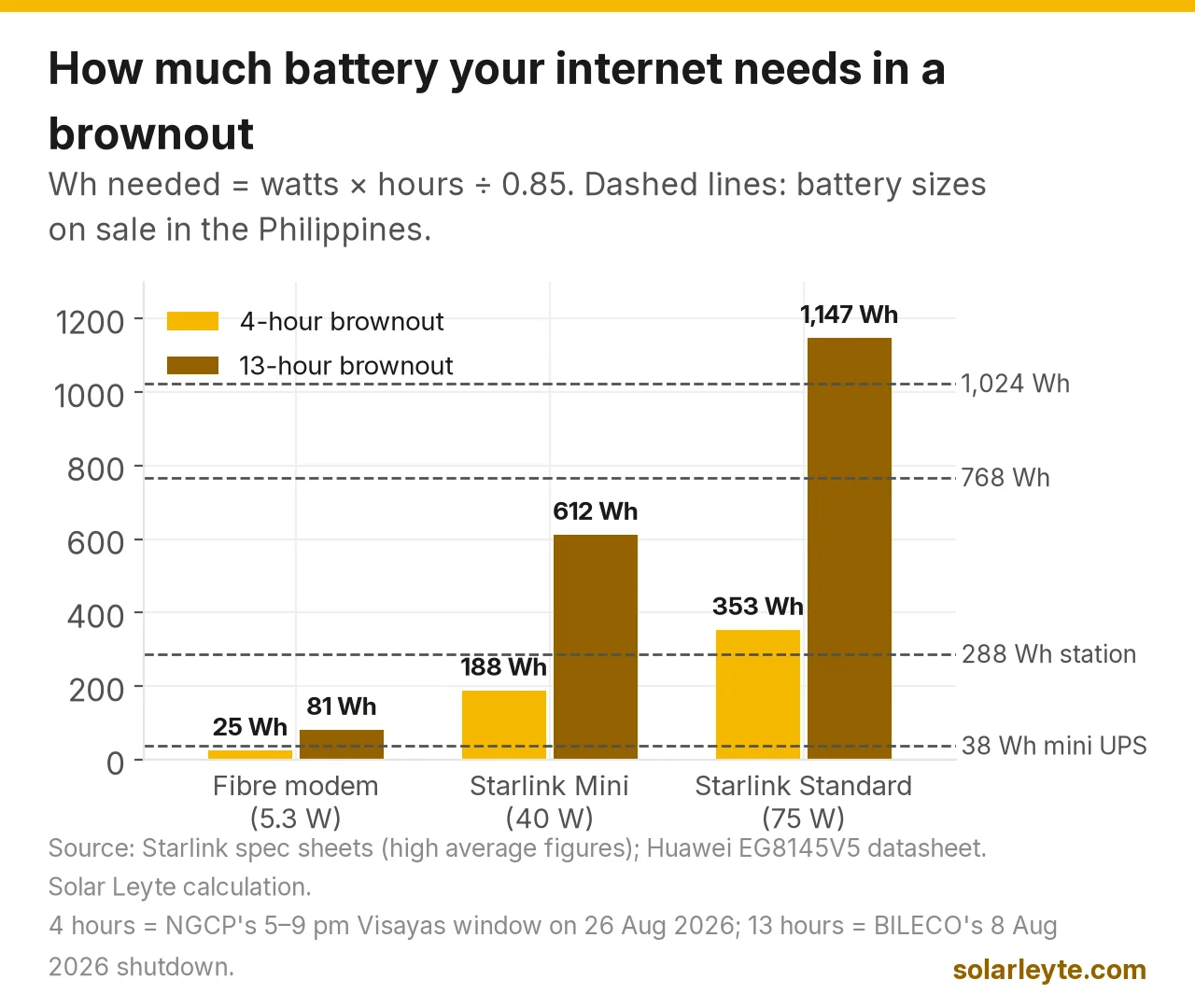
Same rule (Wh × 0.85 ÷ watts), using Starlink's low and high average figures. Capacities are classes from our power station price comparison (official PH store prices on 5 October 2026).
Power station class | Price range we found (5 Oct 2026) | Starlink Mini (25–40 W) | Starlink Standard (50–75 W) |
|---|---|---|---|
About 288 Wh (BLUETTI Elite 30 V2, EcoFlow RIVER 3 Plus) | ₱13,999–₱19,990 | about 6–10 hours | about 3.3–4.9 hours |
768 Wh (EcoFlow RIVER 2 Pro) | ₱28,990 | about 16–26 hours | about 8.7–13 hours |
About 1,024 Wh (DELTA 3 Classic, Anker C1000 Gen 2, Elite 100 V2) | ₱39,990–₱46,900 | about 22–35 hours | about 11.6–17.4 hours |
About 2,048 Wh (DELTA 3 Max, Anker C2000 Gen 2) | ₱61,990–₱69,990 | about 43–70 hours | about 23–35 hours |
How to read it for Leyte and Biliran:
- 4-hour evening brownout: a Starlink Mini needs about 188 Wh at its 40 W top figure (40 × 4 ÷ 0.85), so a 288 Wh unit does it. A Standard needs about 353 Wh (75 × 4 ÷ 0.85), so go to the 768 Wh class.
- 13-hour outage: a Mini needs about 612 Wh and a Standard about 1,147 Wh at the top figures. That's the 768 Wh to 1 kWh class for a Mini and the 2 kWh class for a Standard.
- Running the Mini on DC is more efficient. Powering it through a 100 W USB-C PD port (with Starlink's cable) or a 12–48 V DC source skips the power station's AC inverter. Check the power station's USB-C port is rated at least 100 W, 20 V/5 A, as Starlink specifies.
- Other loads eat into it. A 16-inch stand fan on medium uses about 0.048 kWh an hour, roughly 48 W, in Meralco's test (appliance kWh guide). That's close to a Starlink Standard's low figure, so adding a fan roughly halves your Starlink hours.
Already have a hybrid solar system? Put the Starlink power supply and your modem on the backup (EPS) circuit, not a regular outlet, and the battery carries them through brownouts automatically. A grid-tie system without a battery shuts down when the grid does (grid-tie vs hybrid). If your router is on backup, your inverter's monitoring app stays online too (Solarman app guide).
What Starlink costs to run on BILECO power
Here's "Starlink power consumption per month" in pesos. Running all day for 30 days, at BILECO's September 2026 residential rate of ₱18.93/kWh (PRESYO-PH; October not yet published when we checked):
Device, on 24/7 | kWh a month | At BILECO ₱18.93/kWh |
|---|---|---|
Fibre modem (5.3 W) | about 3.8 kWh | about ₱72 |
Starlink Mini (25–40 W) | 18–28.8 kWh | about ₱341–₱545 |
Starlink Standard (50–75 W) | 36–54 kWh | about ₱681–₱1,022 |
kWh = watts × 720 hours ÷ 1,000, times ₱18.93 for pesos (our calculations). Your rate is on your bill, or in our BILECO rate tracker. Real draw varies, so treat these as a range, not a bill.
Can a solar panel keep it going?
Yes, for the Mini and for brownout recharging. We ran PVGIS (the European Commission's solar model) for a 100 W panel in Naval, Biliran (11.561°N, 124.395°E, 11° tilt facing south, 14% system loss), on 23 October 2026. It averages 0.41 kWh a day over the year, from 0.36 kWh a day in January and July to 0.47 kWh in March and April (PVGIS).
Example with assumptions (Solar Leyte calculation):
- Refilling after a 4-hour brownout: a Mini at 40 W used about 188 Wh. One 100 W panel makes about 0.36–0.47 kWh on an average day, which covers it with room to spare, even allowing for charging losses. A Standard used about 353 Wh; one 100 W panel refills it on an average day, but a 200 W panel gives you margin on cloudy days.
- Running a Starlink Mini off-grid all day (a farm, a fishpond hut, a resort cottage): 25–40 W × 24 hours = 0.6–0.96 kWh a day before losses. A 100 W panel's January average of 0.36 kWh means you'd need roughly 300 W of panels plus about 1 kWh of battery for a few cloudy days. That's sizing work, not a plug-and-play buy. Our small solar panels guide covers 12 V panels and charge controllers.
Simple setups that work
- Fibre WiFi only, short brownouts: one mini DC UPS with Wh listed and a 12 V port rated at least your adapter's amps (₱1,850 to ₱2,999 in our check).
- Fibre WiFi plus laptop and phones, or longer outages: a 288 Wh to 768 Wh power station. Plug the modem into its 12 V DC port with the right cable if it has one, to skip AC losses.
- Starlink Mini: a power station with a 100 W USB-C PD port and Starlink's USB-C cable, or a 12 V LiFePO4 battery with a correctly fused DC connection.
- Starlink Standard, or the whole house: a 768 Wh or larger power station on AC, or a hybrid solar system with a battery. Our portable power guide shows where portable stops making sense.
Safety basics: keep any UPS or power station indoors, dry and ventilated, not on top of the modem. Use the cables made for your device (wrong polarity or voltage can kill a modem). After a typhoon, have a licensed electrician check any wiring that got wet before you plug back in (typhoon checklist).
FAQ
How long can a mini UPS run a WiFi router? For a fibre modem drawing about 5.3 W, a 32 to 38 Wh mini UPS lasts about 5 to 6 hours by our estimate (Wh × 0.85 ÷ watts). Add a second router and it drops to about 2 to 3 hours.
Can I use a mini UPS for Starlink? Not for the Standard: it needs AC and averages 50–75 W. For a Mini (25–40 W) a router UPS gives you about an hour at best. Use a power station with a 100 W USB-C PD port or a proper 12 V battery setup.
How much power does Starlink use per day? At Starlink's published averages, about 0.6–0.96 kWh a day for the Mini and 1.2–1.8 kWh for the Standard if left on 24 hours. At BILECO's September 2026 rate that's about ₱341–₱545 and ₱681–₱1,022 a month.
What size power station do I need for Starlink during a brownout? For a 4-hour evening brownout, about 300 Wh for a Mini and about 768 Wh for a Standard. For a 13-hour outage, about 768 Wh to 1 kWh for a Mini and about 2 kWh for a Standard.
Solar Leyte is run by MACC Systems & Energy Solutions Inc., a solar installer in Naval, Biliran.
Want your WiFi, Starlink and fridge to ride through brownouts? Get a free quote from MACC
Tell us what you need running during a BILECO or LEYECO brownout (modem, Starlink, fridge, fans, lights) and send a photo of your latest bill. We'll show you the backup sizing and the savings math, with no obligation.
- Call/Text: 0955 723 5093
- Email: official@macc-inc.com or benjie@macc-inc.com
- Website: www.macc-inc.com
- Request a quote online: solarleyte.com/quote
- Office: Brgy. Talustusan, Naval, Biliran 6543
Sources (all checked 23 October 2026 unless stated)
- Starlink, Mini specifications (power consumption average 25–40 W; input 12–48 V, 60 W; USB PD 100 W, 20 V/5 A minimum with Starlink USB-C to barrel jack cable; power supply 100–240 V, 1.6 A)
- Starlink, Standard kit product specifications (power consumption average 50–75 W; AC cable)
- Huawei, EchoLife EG8145V5 datasheet (static power 5.3 W; maximum 18 W; 11–14 V DC, 1.5 A)
- Meralco, tested appliances list (Linksys E2500 router, 0.006 kWh per use), via our appliance kWh guide
- Mini UPS listings (23 October 2026): PowerCentral PH, SKE Mini DC UPS B300/B600 (B300 ₱449.60; B600 ₱1,445, sold out); Datablitz, SKE POE-36E (₱1,850); BAVIN PH, PC1236/PC1237 (₱1,949 / ₱2,999); Panther PH, PUD 362 (₱2,490); Techbyte, Mini UPS for WiFi ("14 to 24 Hours" option ₱2,995, no capacity listed)
- Power station prices and the Wh × 0.85 runtime rule: our EcoFlow and solar generator price comparison (official EcoFlow, BLUETTI and Anker PH stores, 5 October 2026; rule from Jackery PH)
- European Commission JRC, PVGIS 5.3 (Naval, 100 W, 11° tilt, south, 14% loss, ERA5 2005–2023), run 23 October 2026
- ICSC, PRESYO-PH national table (BILECO residential, September 2026, ₱18.93/kWh, latest available on 23 October 2026)
- GMA News, Rotating brownouts may hit Visayas consumers on Aug 26, 2026 (5–9 pm window for Eastern Visayas co-ops)
- 8 August 2026 BILECO 13-hour outage: BILECO/NGCP advisory, cited in our solar battery price guide
- All runtime, Wh, kWh and peso figures marked as estimates or examples are Solar Leyte calculations from the numbers above.